When writing release notes—or anything for that matter—it certainly helps to have templates. Below, we've created some easy-to-use templates and rounded up plenty of examples to inspire your release communications.
If you don't let customers know about new features, they'll go unnoticed.
Release notes are just one part of the release communications arsenal, but they are one of the most important. Having a dedicated page for announcements makes it easy for customers to find the most up-to-date information about your product.
It also shows prospects what you've released lately so that they know you're continuously innovating
When writing release notes—or anything for that matter—it certainly helps to have templates. Below, we've created some easy-to-use templates and rounded up plenty of examples to inspire your release communications.
How to choose the right release note format
Not every release deserves the same treatment. A minor bug fix and a major new feature are very different announcements, and treating them the same will either overwhelm your users or undersell your hard work. The format you choose signals to readers how much attention they should pay.
Your release cadence matters just as much as your format. If you ship continuously, a weekly or monthly round-up keeps your changelog readable without flooding inboxes. If your team ships in larger, less frequent batches, individual feature notes or quarterly highlights will serve you better.
Here's a quick guide to matching format with situation:
Single feature or Tier 1 release: Use when one update is significant enough to stand on its own, especially if it could influence a buying decision.
Weekly or monthly round-up: Use when you ship frequently and want one tidy place for users to catch up on everything.
Quarterly or annual highlights: Use to give busy users a summary they'll actually read, and to show prospects you're always improving.
In-progress feature note: Use to build anticipation ahead of a major release and help power users prepare.
Bug fix note: Use when a fix is significant enough that users were actively affected or waiting on it.
Deprecated features or pricing updates: Use whenever something changes that users need to act on or plan around.
When in doubt, ask yourself one question: would a customer be surprised or frustrated if they missed this? If yes, it deserves its own note.
1. Single-feature release note template
Think of this as a basic release note template that you can use for any new feature. If you prefer to call attention to individual features (rather than mention many features in a monthly update), then use this template.
Template:
[Interesting hook to pull in the reader..]
[Description of the new feature]
[Picture or GIF of the new feature.]
[Reason it was created, being sure to link to the feature request if there is one.]
[Description of which plans the new feature is available on.]
Example:
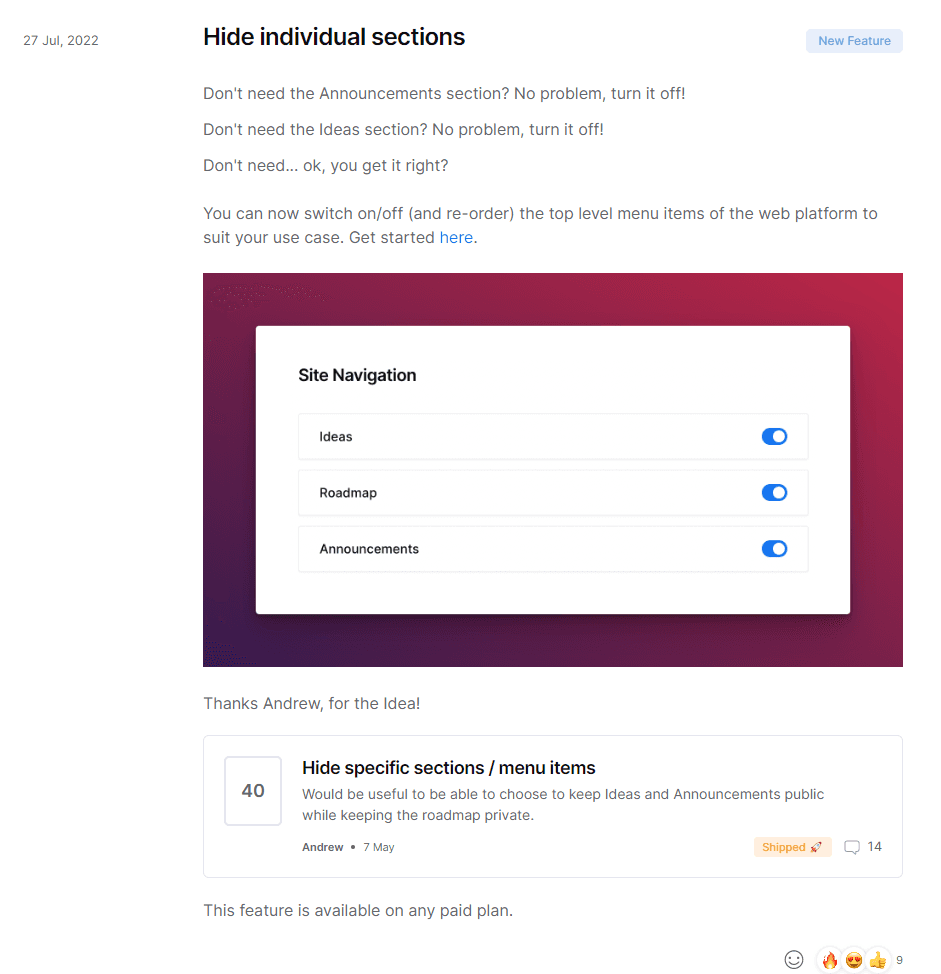
Frill's own release note does this well. This example opens with a clear description of the feature, shows it in action, and then closes by linking directly to the original user request. That last detail is what makes it land. It tells the customer their voice actually shaped the product, which builds trust far more than a generic "we heard your feedback" line ever could.
With Frill you can manage feature requests, roadmaps, and announcements in one place. Check out our example board and create your own.
2. Weekly round-up release note template
Writing weekly releases is rare. Most product managers using the round-up style will write a monthly release (see below). However, if your product is designed for developers, cybersecurity engineers, DevOps engineers, or other technical professionals who depend heavily on the viability of your product, you might decide to take a weekly approach to writing release notes.
If you do, make sure to categorize each item, as our template shows below.
Template:
[New features with a bulleted list of each.]
[Enhancements with a bulleted list of each.]
[Bug fixes with a bulleted list of each.]
[Update reminders with a bulleted list of each (if you've released major features recently, be sure to include them here for a few weeks so more customers will see.)]
Example:
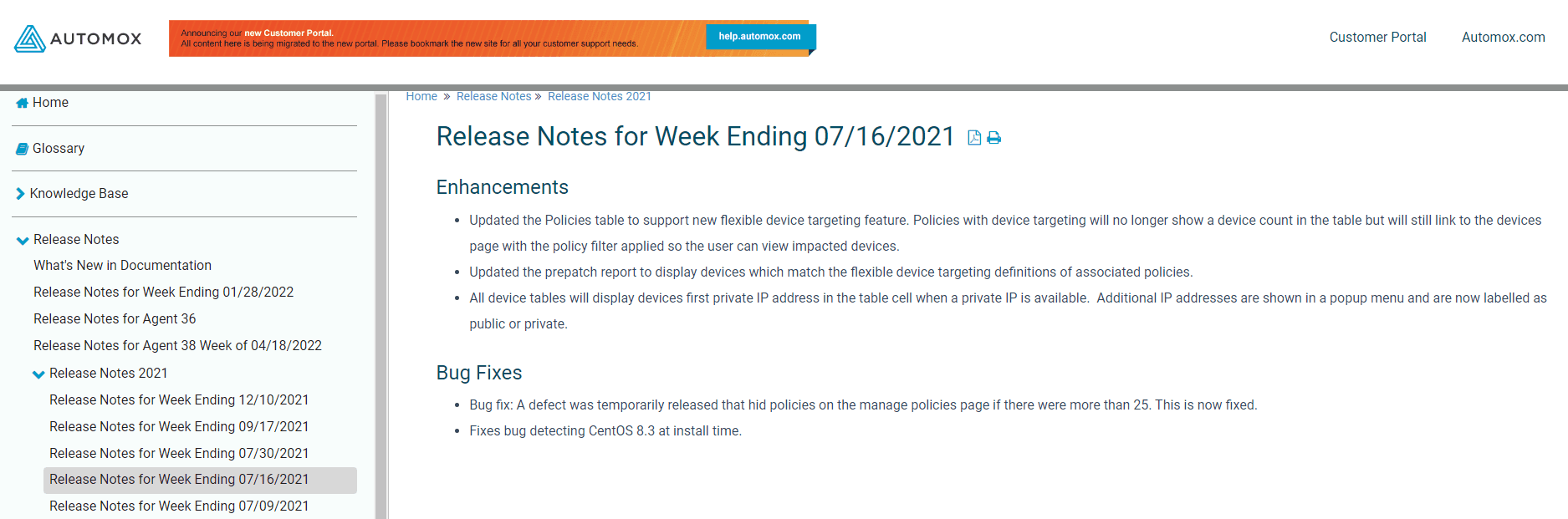
In this weekly update example, Automox groups enhancements and bug fixes together in a clean, scannable layout. This works because their audience is technical users who want signal, not story. They don't need to be sold on the value of a fix. They just need to know it happened, find it fast, and move on. Shorter copy and tight categorization respects their time, and that respect earns loyalty.
3. Monthly round-up release note template
Template:
For your monthly round-up page, use this template:
[Names or numbers of each release.]
[Preview description of each release.]
For the release notes that are linked from the monthly round-up, use this tempate:
[Table of contents.]
[Subheadings for clear names of new important announcements.]
Description and GIF or image for each important announcement.]
[Sub-section for speed and performance improvements in bulleted list.]
[Sub-section for bug fixes in bulleted list.]
[Sub-section for webinars, tutorials, or other resources with bulleted list.]
Example:
ClickUp's monthly approach works because it operates on two levels. The top-level page gives a quick overview of everything that shipped, so casual readers get the gist. The linked individual notes give detail for users who actually want to dig in. This two-tier structure means no one is overwhelmed, and no one is left wanting more. The addition of webinar links is smart too: it turns a passive changelog into an active learning moment.
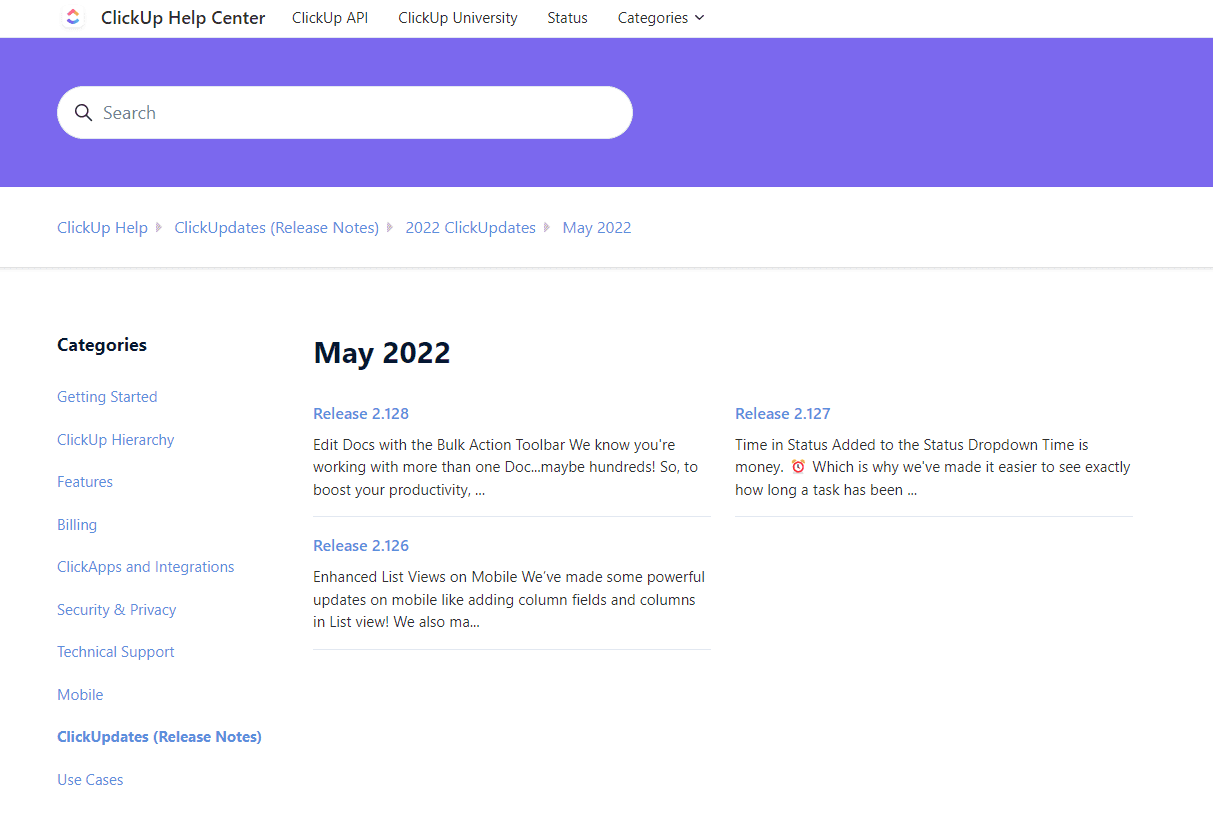
When you click on one of those release note links, you'll then be able to see the full note, with all of the major features, enhancements, speed improvements, and bug fixes.
ClickUp also includes links to webinars where users can learn more about the product and its new updates.

4. Quarterly or seasonal release highlights template
Updating your target users about your product releases on a quarterly or seasonal basis (winter, spring, etc.) is not often enough.
However, this release note template can be really effective for summing up the highlights. Let's face it, the vast majority of your users are not going to read all of your release notes in detail. By offering a quarterly summary, you can give them one place to turn for all of the most important updates. This release note can then be shared via email and on social media.
Template:
[A quick intro with the total number of releases that quarter.]
[A short description with the top-level theme of the most important releases and what they mean for users.]
[A bullet point list of the most notable releases that quarter.]
Example:
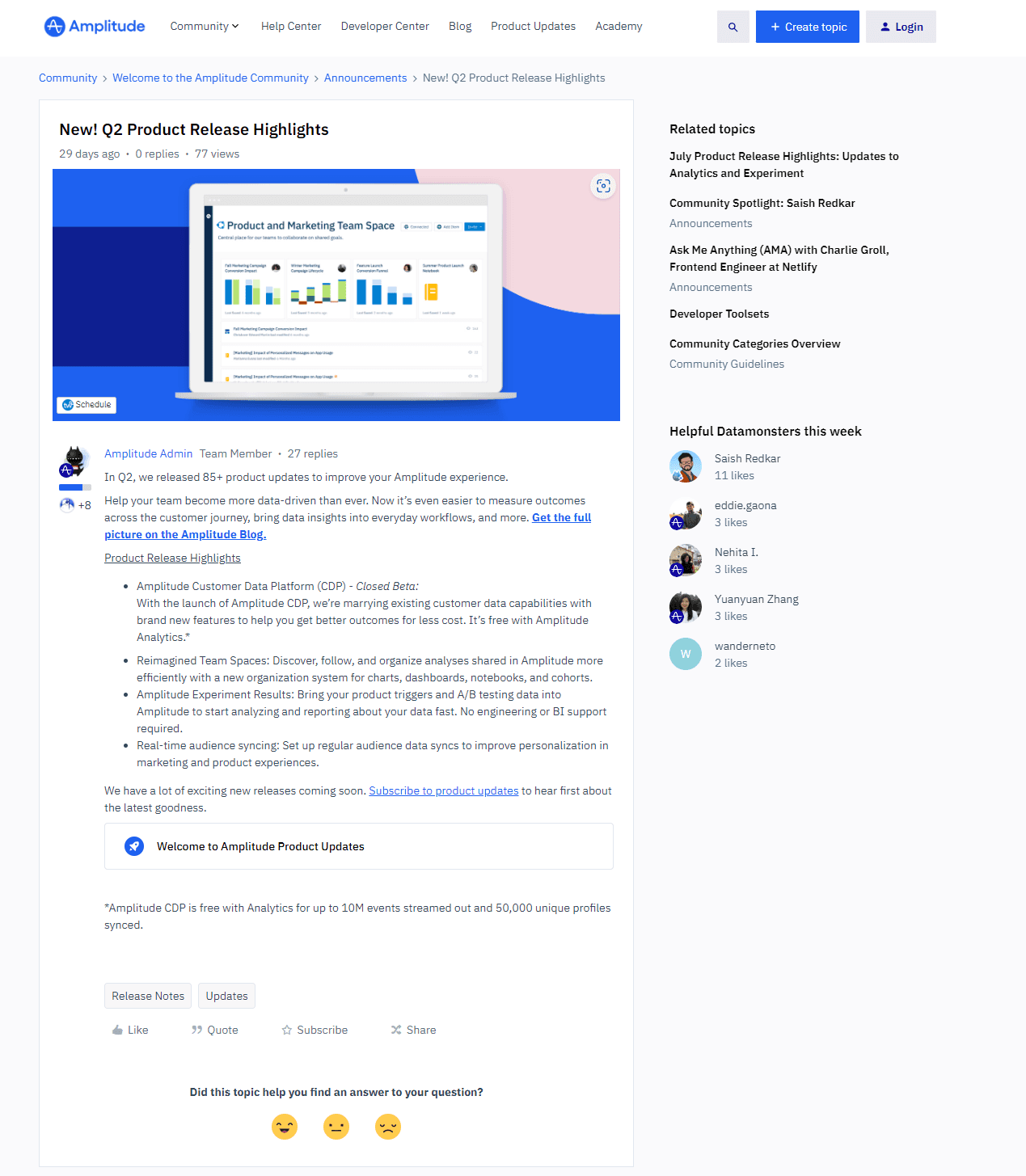
Amplitude offers us a great example of a quarterly highlight reel. Amplitude's highlight reel works because it respects the reality that most users will never read your full changelog. By keeping it under 200 words with a clear thematic thread, they give time-pressed users one place to get the most important picture. The tight word count also forces a discipline that's good for the writer: if it doesn't make the cut here, it probably wasn't a highlight.
5. Annual release note template
An annual release note offers a smart way for companies to share what they've been up to at the end of every year. You can write this annually and send it out, or have it always available and add the most important releases to it throughout the year.
Template:
[The name of the page.]
[A quick description of the product's overall value, the main theme of the most important updates, and how the updates affect the customer.]
[A subheading and description for every month, or every major release that year.]
Example:
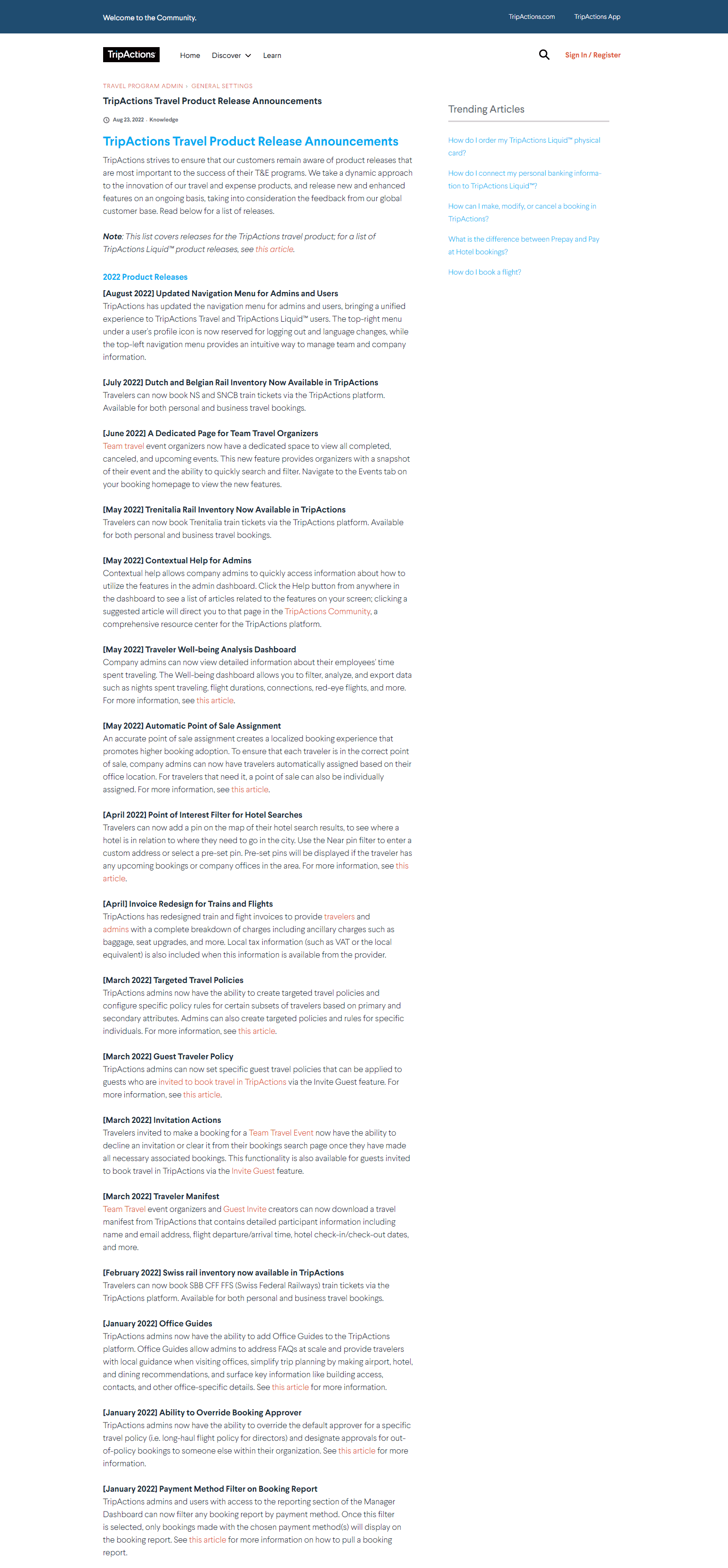
Navan offers a single page where users can view the most important release notes completed each year. Navan keeps all their major releases in one place, organized by month. What makes this effective is that it functions as a living proof point. The same logic applies to any vertical spend platform — a fleet card provider like Coast, for example, gives prospective fleet managers the same kind of "this product is alive" reassurance when its updates are visible in one place. A prospect doing due diligence can land on this page and immediately see that the product has been consistently evolving. That momentum is a quiet but powerful sales signal, and it costs nothing extra to maintain once the habit is in place.
6. Tier 1 product release note template
A Tier 1 release note is (obviously) one written for a Tier 1 release, meaning a product release that is important, will impact the most number of users, and could have an impact on whether prospective users decide to onboard to your platform.
The template can follow the basic, one-feature template used above.
Template:
[Interesting hook to pull in the reader..]
[Description of the new feature]
[Picture or GIF of the new feature.]
[Reason it was created, being sure to link to the feature request if there is one.]
[Description of which plans the new feature is available on.]
Example:
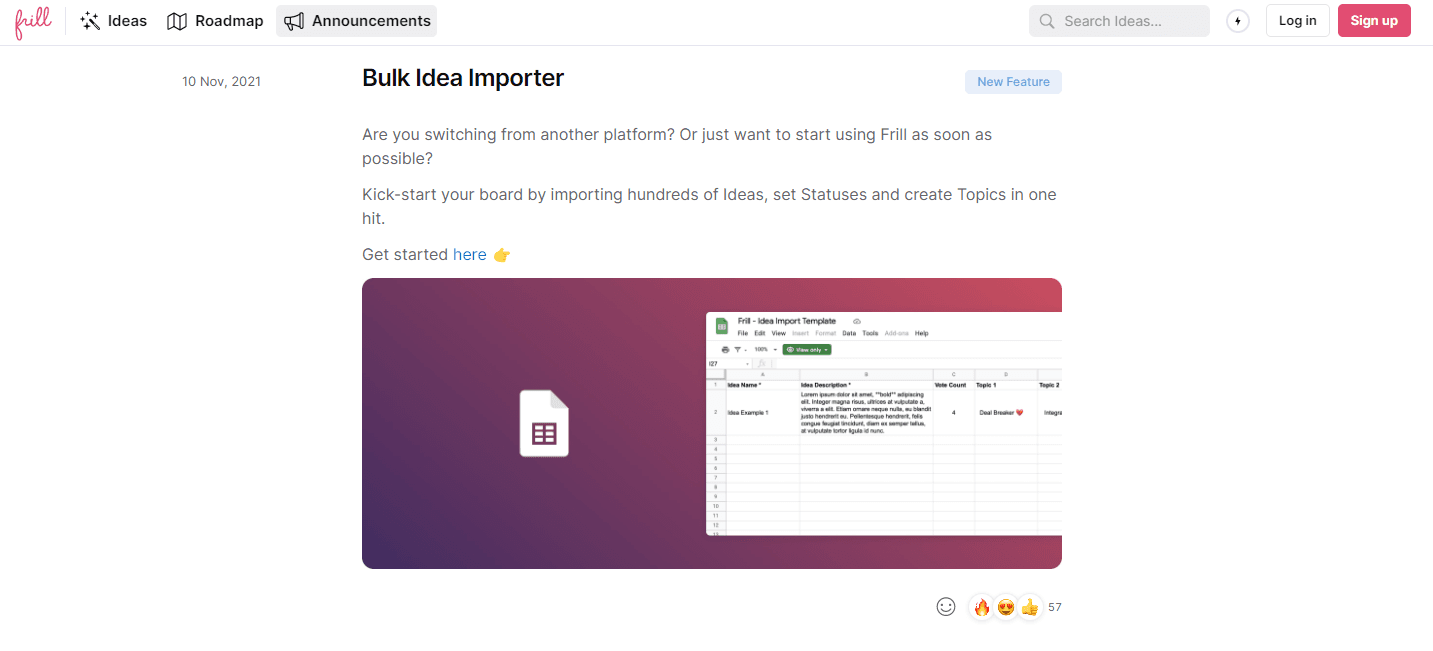
In this example, we showcase our new bulk idea importer, so that users can add feature requests from an Excel or CSV file. The bulk idea importer note works as a Tier 1 example because the stakes are made explicit. The copy doesn't just explain the feature — it connects the feature to a real decision point for new users. When a release note spells out why a feature matters to someone evaluating your product, it does double duty: it informs existing users and quietly addresses a sales objection at the same time.
7. Tier 2 product release note template
A Tier 2 product release is less impactful than Tier 1. It probably won't impact whether or not new users decide to sign up for your product, but it can have a positive impact on a large base of users.
This template will typically also follow the single-feature release template.
Template:
[Interesting hook to pull in the reader..]
[Description of the new feature]
[Picture or GIF of the new feature.]
[Reason it was created, being sure to link to the feature request if there is one.]
[Description of which plans the new feature is available on.]
Example:
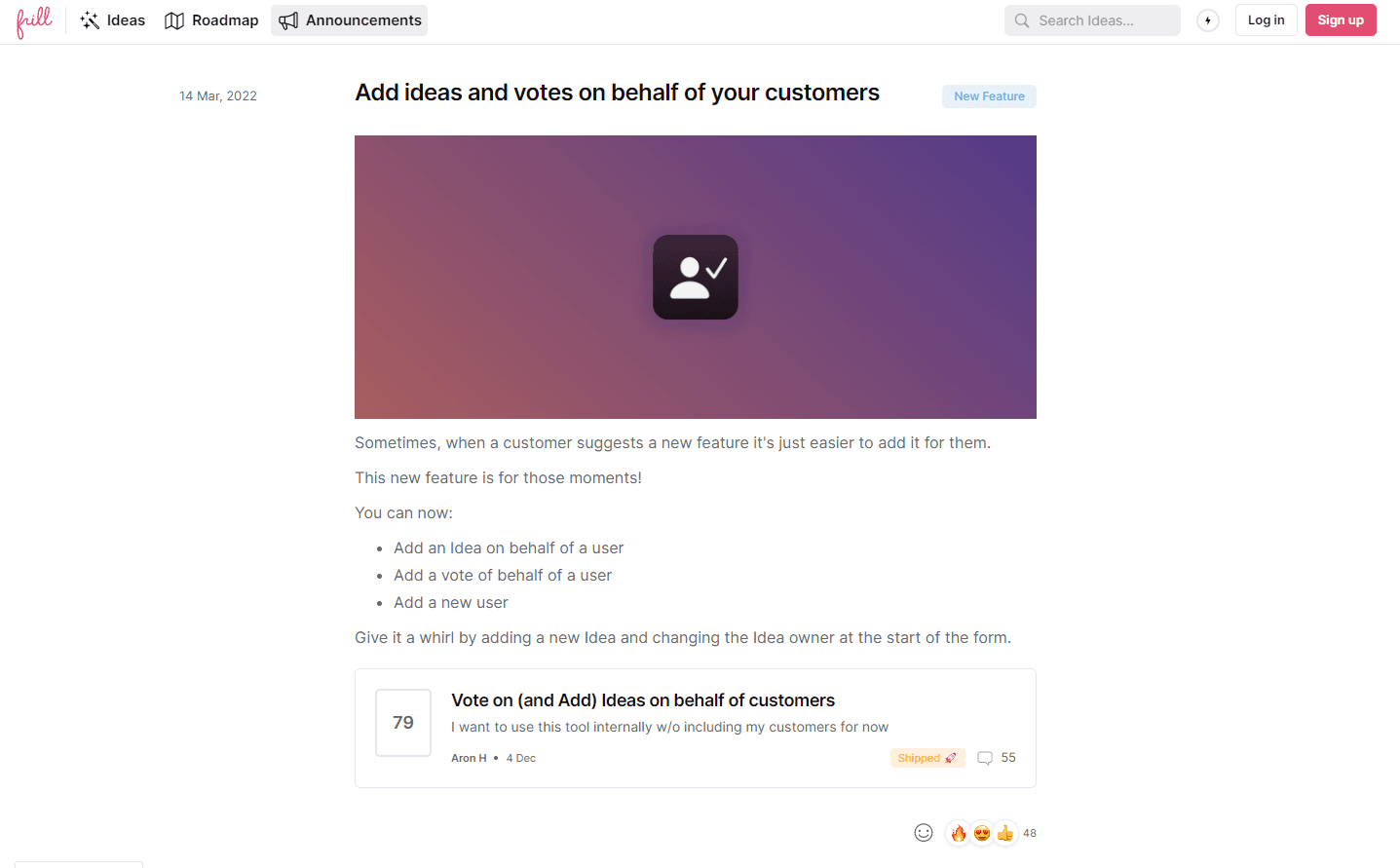
In this example, we describe the release of a feature that allows users to add ideas on behalf of their users and customers. This is something that a lot of existing users will enjoy, but probably not something that would determine whether someone decides to sign up in the first place. The note covering idea submission on behalf of users follows the same structural format as a Tier 1 note, and that consistency is intentional. Users shouldn't have to learn a new reading pattern for every announcement. What changes is the framing: the copy focuses on an improvement to daily workflow rather than a capability that changes what the product can do. Same format, different emphasis, and that distinction is what makes tiering useful.
8. Tier 3 product release note template
And for our last tier, we have Tier 3. These product releases are less impactful. They are typically enhancements to existing features.
The template is a slightly modified version of the single-feature release note template, because it's framed more as an enhancement.
Template:
[Description of the existing feature and why it needed an update.]
[Picture or GIF of the enhancement.]
[Reminder of which plans the existing feature is available on, and a call to action to upgrade the plan if they don't have the feature available.]
Example:
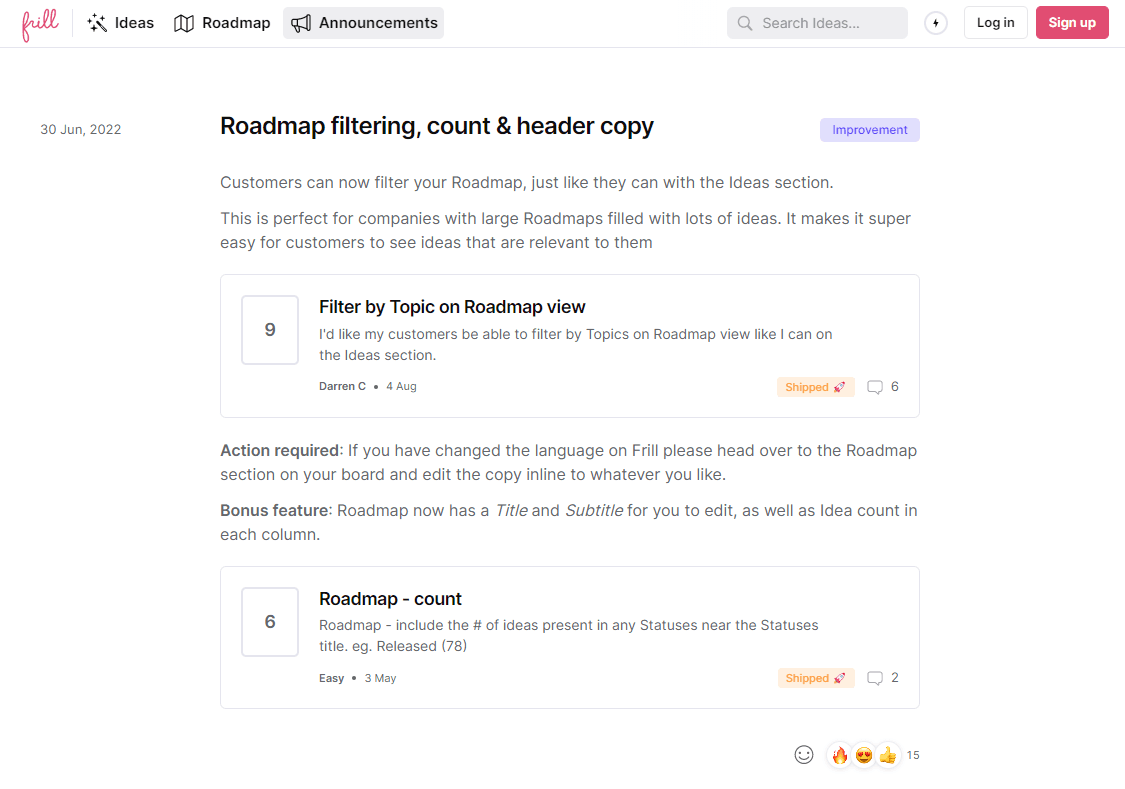
In this example, we share a Tier 3 release note on how customers can now filter through ideas to find ones that interest them. The idea filtering enhancement note leads with context rather than a feature announcement. It reminds users why the original feature exists before explaining what changed. This is exactly the right approach for a Tier 3 release, because the improvement only makes sense if the reader remembers the baseline. The call to action to upgrade is placed at the end naturally, not pushed aggressively, which makes it feel helpful rather than salesy.
9. Major bug fix release note template
Most product managers will write about bug fixes in their weekly or monthly release note round-ups. However, for a big bug fix, you might want to give it its own release note.
Template:
[Title of the bug fix or bug fix round-up.]
[Subsection for technology improvements with bulleted list.]
[Subsection for major bug improvements with bulleted list.]
[Subsection for localization updates with bulleted list.]
Example:
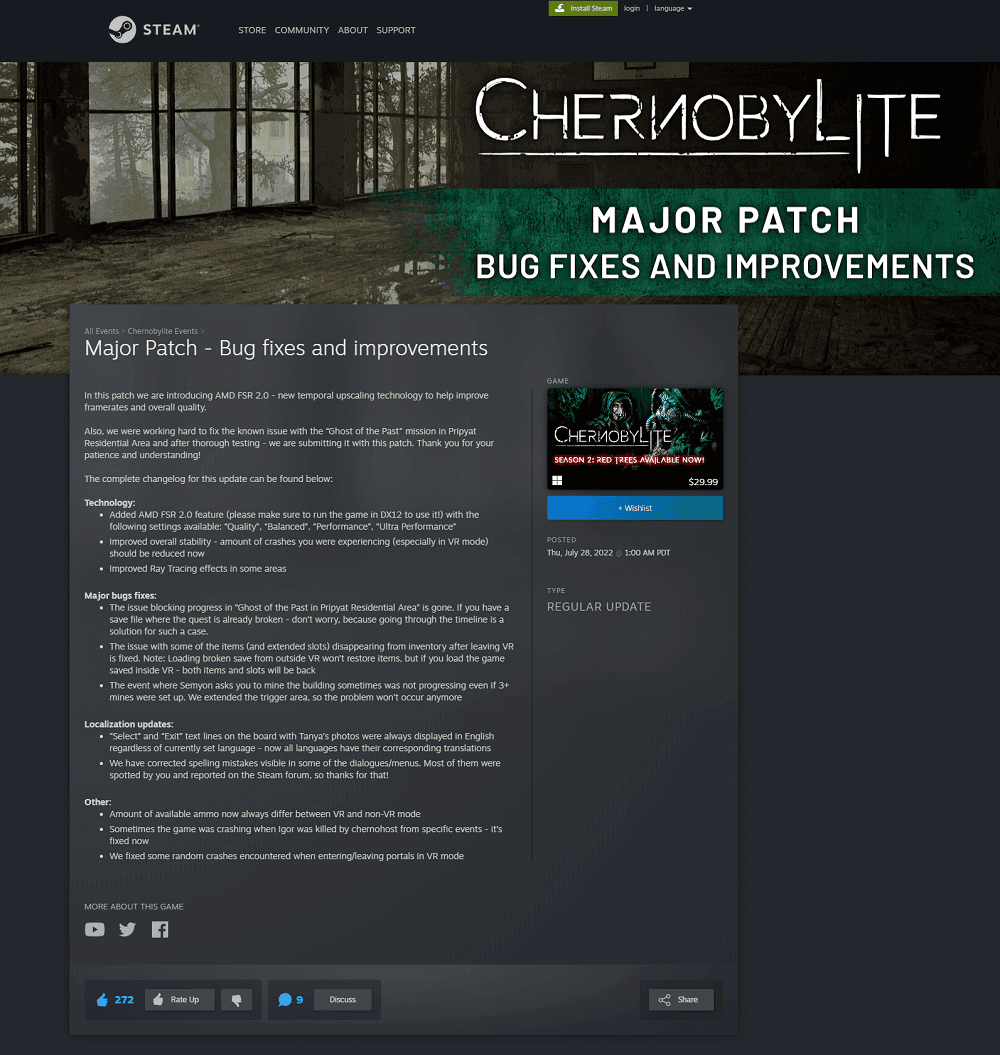
In this bug fix release note, the developers of the game Chernobylite detail multiple bug fixes and patches. The Chernobylite bug fix note earns its own dedicated page because one of the fixes was blocking player progress entirely. That's the key lesson here: not every bug fix deserves a solo announcement, but one that stops users from doing the thing they paid to do absolutely does. Calling it out separately shows users you took the issue seriously. It also prevents the fix from getting buried in a round-up where it could easily be missed.
10. In progress feature note template
This sort of release note isn't written nearly as often as it should be.
Of course, it's best practice to share what's up and coming in your public roadmap, but for very important releases or even seasonal round-ups, it can be smart to give your users a hint of what's coming in your announcement section—simply because it's another communication channel that's available to you.
Template:
[A quick overview of what the release offer, in terms of business results, productivity, etc.]
[A reminder of why it's important to read the release note in advance to prepare for the release.]
[A sub-section for each major product and feature and how it will change.]
Example:
This example from Salesforce was written at least 4 months before the release, because it's not even 2023 yet.
It starts with a clear, simple hook: "The Winter ’23 release helps you grow your business, reduce costs, and create efficiencies."
Salesforce published this note months before the release date, and that lead time is the whole point. For complex products with large teams of users, early notice is necessary. The hook does the heavy lifting here: one sentence tells users exactly what business outcomes they can expect, which gives them a reason to actually read ahead and prepare. That's a much stronger opening than a version number and a bullet list.
11. New pricing release note template
Whether you publish it on your blog, your product announcement roll, or both, one thing is clear: you'll need a go-to resource for users to understand your new pricing.
Template:
[Release note title, typically including "Pricing Update."]
[Overarching description of the new pricing and reasoning.]
[Image of new pricing structure and plans.]
[Details on what the new plans include.]
[Who the new pricing affects, when it goes into place, and whether or not grandfathering is available.]
[Frequently asked questions.]
Example:
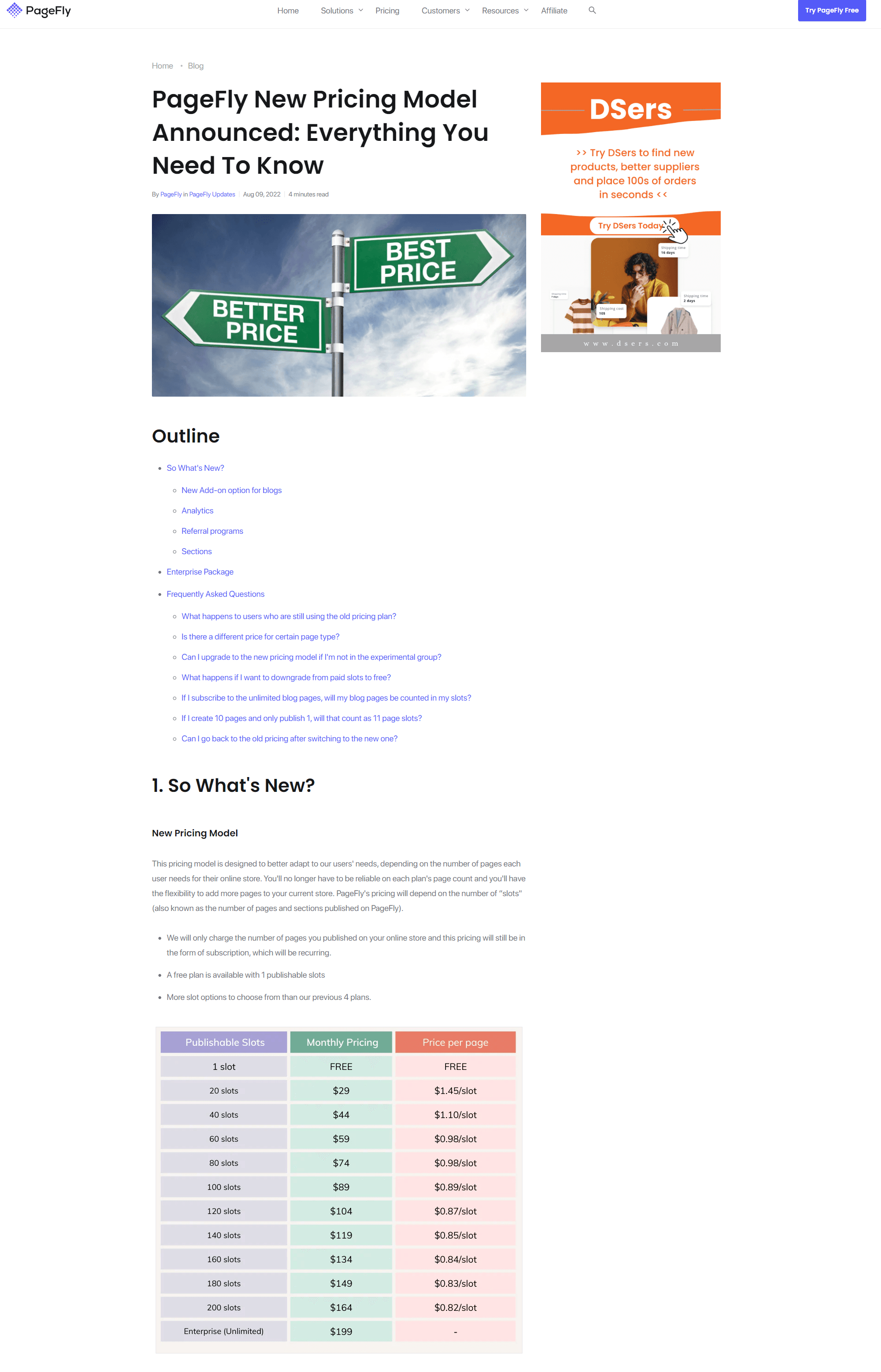
This example from PageFly includes helpful descriptions so that users are crystal clear on the new pricing structure. PageFly's pricing update note works because it over-communicates on purpose. Pricing changes create anxiety, and the FAQ section at the bottom addresses the specific questions users are too embarrassed to ask support. Visuals of the new pricing structure remove any ambiguity about what users are getting. When the goal is to reduce churn from a pricing change, clarity is the most important thing you can offer — and this note leads with it.
12. Deprecated features page template
Sometimes companies will write an individual release note for deprecated features, but creating a deprecated features page is more common practice. This way, you have all deprecated features in one place.
Features are typically deprecated because they're not popular or are no longer needed, so it makes sense to hide them in one dedicated page rather than announce them to all users. You shouldn't be deprecating features people really want.
Template:
[Title, typically "Deprecated and removed features" to make it clear for non-technical users.]
[Description of why features get depricated.]
[List of deprecated features, their area or product, and whether or not a replacement was offered.]
Example:
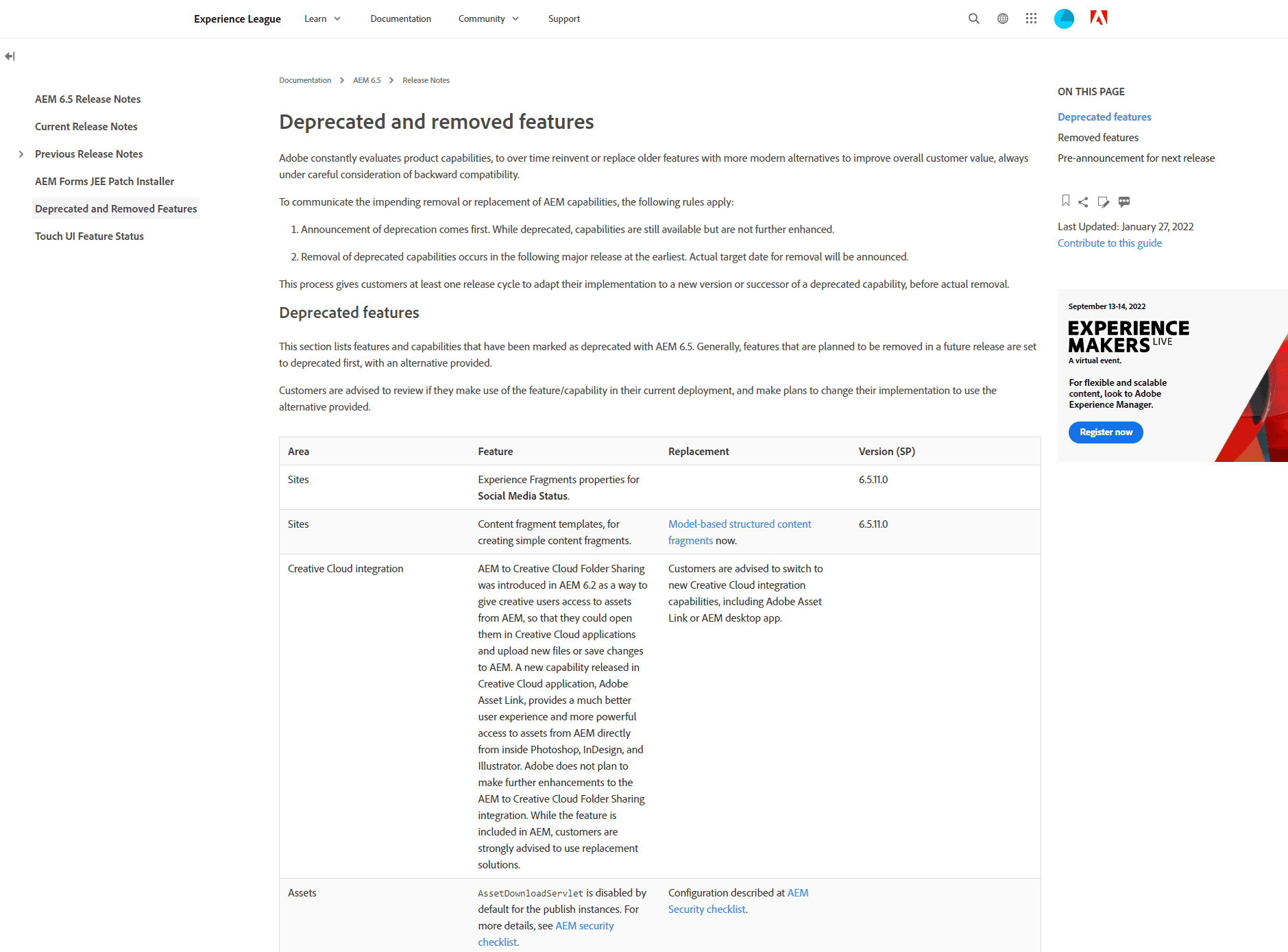
In this example from Adobe Experience, we see all deprecated features in one place. Adobe Experience Manager's deprecated features page works because it consolidates information that would otherwise be scattered. Users searching for answers about removed functionality land in one place, not a graveyard of old release notes. Including whether a replacement was offered is a small detail that carries real weight: it shows the team thought about the user's next step before taking something away. Deprecation pages rarely get celebrated, but done well they prevent a lot of support tickets.
13. [BONUS] Product updates landing page template
Do you have a landing page for your product updates? If you offer a complex, enterprise product, this can be a smart way of winning over both prospects and current clients.
This is an uncommon product release communications strategy that is very visually appealing.
Of course, you'll still need to write regular release notes, but this can be a way of summing everything up and packaging it together.
Template:
[Title of product release theme or time period.]
[Paragraph description of recent releases and why they matter.]
[Sub-sections and images for each release category, product, or feature.]
Example:
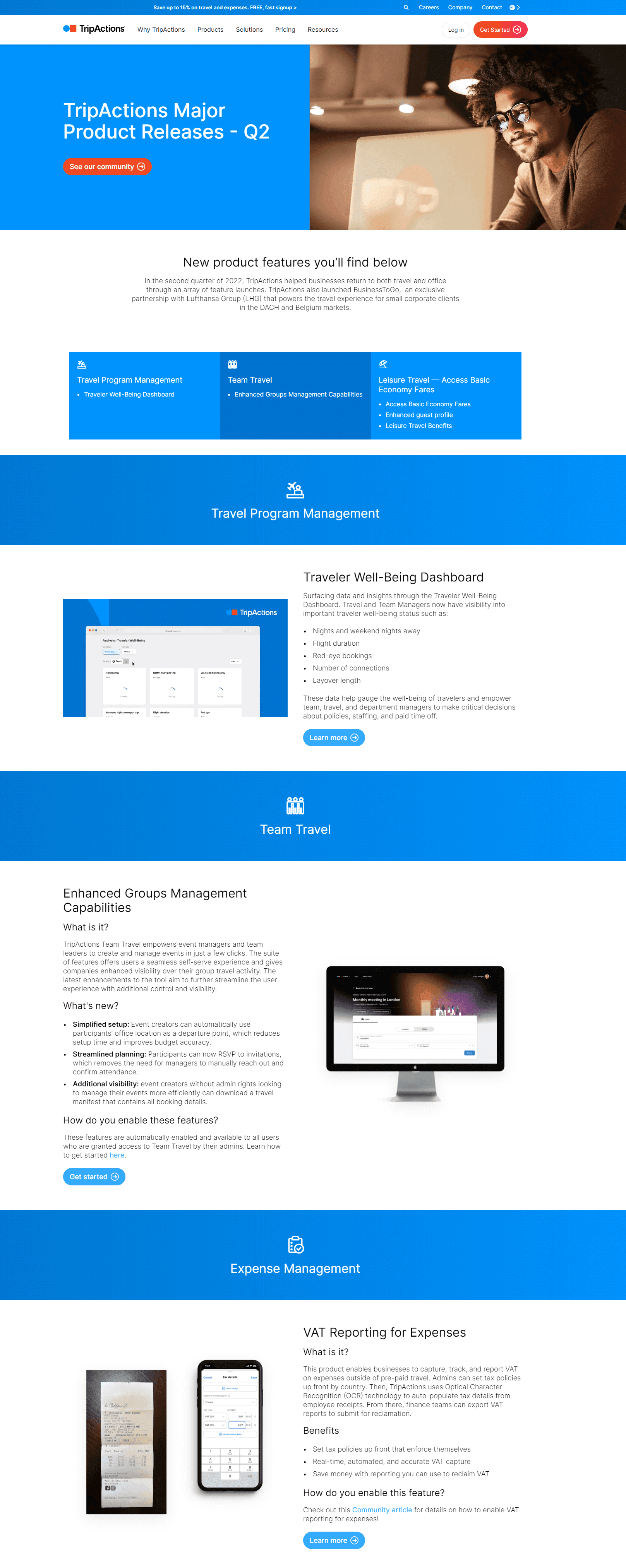
Navan takes the unusual step of turning their release history into a visually polished, sales-ready asset. Most companies treat their changelog as a developer resource. Navan treats it as a revenue tool. The result is something a sales rep can send to a prospect or a customer success manager can share with an at-risk account, without any extra work. The lesson here is that the same information, packaged differently, can serve a completely different business goal.
Frequently asked questions about release notes
How long should release notes be?
It depends on the release tier. A single feature note can be as short as 100 words if the feature is straightforward. A monthly round-up might run much longer. The rule is simple: use as many words as the release needs, and cut the rest. Padding hurts readability.
Where should I publish release notes?
Publish them on a dedicated changelog or announcements page within your product or website. From there, share highlights via email and social media. Keeping a central page means users always have one reliable place to check, and you're not relying solely on inbox delivery to reach them.
How often should you write release notes?
Match your cadence to your ship rate. If you release continuously, weekly or monthly round-ups work best. If you ship in larger batches, individual notes per release make more sense. The worst cadence is an inconsistent one: users stop trusting a changelog that goes quiet for months at a time.
What should release notes include?
Every release note should cover what changed, why it changed, and who it affects. For new features, add a visual and mention which plan it's available on. For bug fixes, name the issue clearly. Users should never finish reading a release note unsure of what action, if any, they need to take. For the full list of release notes best practices, including prompts you can copy for each one, see our complete guide
What is the difference between release notes and a changelog?
They're often used interchangeably, but a changelog is typically a running log of all changes, while release notes are more curated announcements tied to specific releases. Changelogs tend to live in developer documentation. Release notes are written for a broader audience and usually include more context about why a change was made.
Do release notes help with SEO?
Yes, if they're written with real language your users search for. Feature names, problem descriptions, and how-to phrasing all create indexable content. A well-maintained public changelog also signals that your product is actively developed, which builds credibility with both search engines and prospective customers reading your site.
Looking for one place to manage feature ideas, your roadmap, and announcements? Check out Frill.

Dayana Mayfield
Dayana Mayfield is a B2B SaaS copywriter who believes in the power of content marketing and a good smoothie. She lives in Northern California.