Top customer feedback sources to understand user needs, improve your product, and collect insights from surveys, analytics, reviews, and support.
Customer feedback can come from almost anywhere. Users share ideas in support tickets, complain on social media, request features during sales calls, and reveal frustrations through product analytics.
If you only listen to one channel, you miss the bigger picture. The best product teams collect feedback from many sources so they can understand both what customers say and what they actually do.
In this guide, we’ll break down the most important customer feedback sources and how product teams use them to improve their SaaS products. You’ll learn where valuable feedback lives, how to capture it, and how to turn scattered insights into clear product decisions.
We’ll also look at behavioral feedback tools like Mixpanel and Google Analytics, which reveal user behavior that customers might never mention directly. When you combine these insights with direct feedback, you build a much clearer view of what your users actually need.
What are customer feedback sources?
Customer feedback sources are the channels where users share opinions, experiences, and suggestions about your product. These sources can include direct communication—like surveys or support tickets—or indirect signals, such as analytics data that shows how people actually use your product.
For SaaS teams, relying on a single channel rarely tells the full story. Customers speak up in different places depending on the situation. Some leave feature requests in a feedback portal, while others reveal problems through support tickets or usage patterns.
To make sense of it all, product teams need to gather insights from multiple sources and organize them in one system. This approach helps teams spot patterns, prioritize improvements, and avoid making decisions based on incomplete information.
There are two main types of feedback sources:
Direct feedback: Explicit comments from users such as surveys, interviews, feature requests, and support tickets.
Behavioral feedback: Data showing how users interact with your product, such as analytics from Mixpanel or Google Analytics.
Both types provide valuable insights, especially when analyzed together.
Why you should collect feedback from multiple sources
Customers interact with your product in many ways, and each interaction can reveal something useful. If you only collect feedback from one channel, you risk missing valuable insights that could improve your product.
Collecting feedback from multiple sources helps product teams build a more complete understanding of user needs.
Customers share feedback across many channels: Users don’t all communicate the same way. Some submit feature requests, others contact support, and many simply change how they use your product.
Avoid bias from a single feedback method: Surveys may attract highly engaged users, while analytics capture behavior from everyone. Combining sources reduces blind spots.
Combine qualitative and quantitative insights: Direct feedback explains why users feel a certain way, while analytics reveal what they actually do.
Turn insights into roadmap decisions: Product teams use patterns across feedback sources to prioritize features, fix usability issues, and guide product strategy.
When you connect multiple feedback channels, you move from isolated comments to clear, actionable insights.
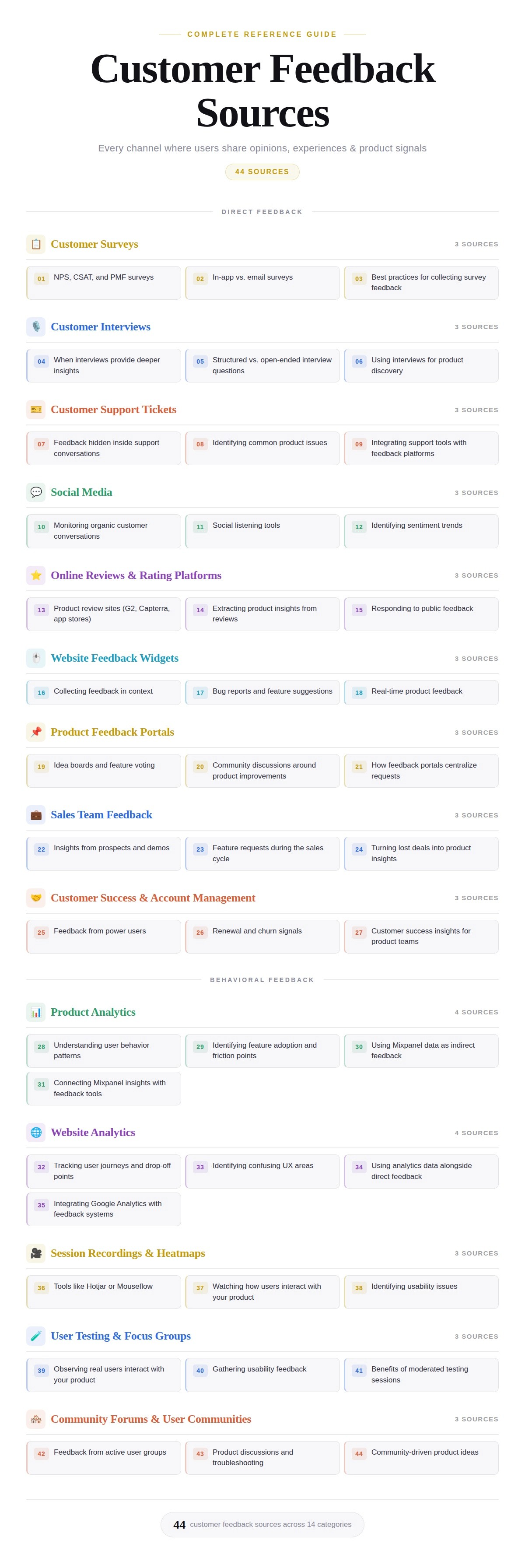
Top customer feedback sources
Customer feedback can come from dozens of places. Some channels capture what users say, while others reveal what they actually do inside your product.
The best product teams combine multiple sources to uncover patterns, validate ideas, and make smarter roadmap decisions.
Customer surveys
Surveys remain one of the most direct ways to collect structured feedback. They help product teams measure satisfaction, identify friction, and uncover opportunities for improvement.
1. NPS, CSAT, and PMF surveys
Three survey types appear most often in SaaS products.
Net Promoter Score (NPS) measures customer loyalty by asking how likely users are to recommend your product. It reveals overall sentiment and helps identify promoters and detractors.
Customer Satisfaction Score (CSAT) focuses on specific experiences. Teams often trigger it after support interactions or feature usage.
Product Market Fit (PMF) surveys answer a critical question: how disappointed would users be if your product disappeared? These responses highlight whether you deliver real value.
2. In-app vs email surveys
Where you send surveys matters just as much as the questions.
In-app surveys appear while users interact with your product. They capture feedback in the exact moment an experience happens.
Email surveys work better for longer questions or customer research. They also reach users who may not log in frequently.
Many SaaS teams use both channels to reach different user segments.
3. Best practices for collecting survey feedback
Short surveys perform better than long ones. Ask one clear question whenever possible.
Trigger surveys at meaningful moments, such as after onboarding or feature usage. Timing improves response quality.
Finally, share results with your team. Feedback only matters if it influences product decisions.
Customer interviews
Interviews provide some of the richest insights product teams can gather. They reveal motivations, frustrations, and use cases that rarely appear in surveys.
Because interviews involve real conversations, they allow teams to explore problems in much greater depth.
4. When interviews provide deeper insights
Interviews work best when you want to understand why something happens.
For example, analytics might show that users abandon onboarding halfway through. An interview can uncover the exact point where confusion begins.
They also help uncover unmet needs. Customers often describe workflows or problems that product teams never considered.
5. Structured vs open-ended interview questions
Interview structure influences the type of insight you collect.
Structured interviews follow a consistent set of customer feedback questions. This approach makes it easier to compare responses across participants.
Open-ended interviews allow conversations to flow naturally. Participants often reveal unexpected insights when they explain their experiences in their own words.
Most product teams blend both approaches to balance consistency and discovery.
6. Using interviews for product discovery
Interviews play a central role in product discovery.
Teams often run interviews before building new features. They validate problems, confirm demand, and explore potential solutions.
These conversations also strengthen relationships with customers. Users appreciate when companies listen before shipping changes.
Customer support tickets
Support conversations contain a constant stream of customer feedback. Every question, complaint, or bug report reveals something about the product experience.
Product teams often overlook this source because it lives inside help desk tools.
7. Feedback hidden inside support conversations
Customers frequently explain their frustrations when they contact support.
They might describe confusing workflows, broken features, or missing functionality. Each ticket tells a small story about the product experience.
When product teams review support conversations regularly, they uncover valuable product insights.
8. Identifying common product issues
Patterns matter more than individual complaints.
If multiple customers report the same issue, the problem likely affects many more users who never contacted support.
Tracking recurring themes helps teams prioritize bug fixes and usability improvements.
9. Integrating support tools with feedback platforms
Support tools often operate separately from product management tools.
Integrations solve this problem. When support conversations connect to feedback platforms, teams can track trends across tickets, feature requests, and bug reports.
This process helps product teams turn scattered support conversations into actionable insights.
Social media
Customers often speak freely on social media. They share praise, frustrations, and feature requests without being prompted.
These conversations provide unfiltered insights into how people experience your product.
10. Monitoring organic customer conversations
Many customers mention products on platforms like X, LinkedIn, Reddit, and Facebook.
These posts often reveal real reactions to product updates, pricing changes, or customer experiences.
Monitoring these conversations helps teams spot emerging issues quickly.
11. Social listening tools
Social listening tools make this process easier.
Platforms like Brandwatch or Sprout Social track mentions, hashtags, and keywords across social networks. Teams can monitor conversations without searching manually.
These tools also highlight trends across large volumes of posts.
12. Identifying sentiment trends
Beyond individual comments, social media reveals broader sentiment patterns.
If customers consistently praise a feature, the product team gains validation. If complaints spike after a release, teams can respond quickly.
Tracking sentiment helps companies understand how perception changes over time.
Online reviews and rating platforms
Review sites play a major role in SaaS buying decisions. They also provide valuable feedback from real users.
Platforms like G2, Capterra, and app stores host thousands of detailed customer reviews.
13. Product review sites
Customers often write detailed feedback on review platforms.
They describe strengths, weaknesses, and comparisons with competing products. Many also explain how they use the software in real workflows.
This information helps product teams understand customer priorities.
14. Extracting product insights from reviews
Reviews contain a mixture of praise, criticism, and feature suggestions.
Product teams can analyze recurring themes across reviews to identify product gaps or opportunities.
For example, repeated requests for a specific feature signal unmet demand.
15. Responding to public feedback
Responding to reviews builds trust with customers.
A thoughtful response shows that the company listens and cares about user feedback.
It also demonstrates transparency to potential buyers who read the reviews later.
Website feedback widgets
Website widgets capture feedback directly inside your product or website. They allow users to share ideas or report issues without leaving the page.
This immediacy often increases participation.
16. Collecting feedback in context
Context matters when gathering feedback.
When users submit feedback while interacting with a feature, they provide more accurate details about the issue.
This context helps product teams understand exactly where problems occur.
17. Bug reports and feature suggestions
Widgets often include options for bug reports or feature requests.
Users can quickly describe problems or propose improvements without navigating to another system.
These submissions help teams identify issues early.
18. Real-time product feedback
Real-time feedback accelerates product improvement.
Instead of waiting for surveys or interviews, teams receive suggestions immediately as users interact with the product.
This constant feedback stream helps teams react faster to problems.
Product feedback portals
Feedback portals create a centralized place where users can submit ideas, vote on suggestions, and discuss product improvements.
They help teams organize large volumes of feedback.
19. Idea boards and feature voting
Idea boards allow customers to submit feature requests.
Other users can vote on ideas they support. Feature and idea upvoting helps product teams quickly identify which requests matter most.
Popular ideas often represent clear product opportunities.
20. Community discussions around product improvements
Feedback portals also encourage conversations between users.
Customers often share use cases, explain problems, and discuss potential solutions.
These discussions provide valuable context that simple feature requests cannot capture.
21. How feedback portals centralize requests
Without a central hub, feedback spreads across many channels.
Portals consolidate feature requests, comments, and votes in one place. This organization makes it easier for product teams to track demand and communicate updates.
Centralization also helps customers see that their voices matter.
Sales team feedback
Sales teams talk with prospects every day. These conversations reveal valuable insights about buyer expectations and product gaps.
Product teams benefit greatly from these frontline insights.
22. Insights from prospects and demos
During demos, prospects often ask detailed questions about features and workflows.
These questions reveal what buyers care about most. They also highlight areas where the product might fall short.
Sales conversations provide early signals about market needs.
23. Feature requests during the sales cycle
Prospects frequently request features during evaluations.
Some requests reflect legitimate product gaps, while others reveal opportunities for future expansion.
Tracking these requests helps product teams prioritize improvements that influence revenue.
24. Turning lost deals into product insights
Lost deals contain valuable lessons.
Sales teams often learn why prospects chose competitors or decided not to purchase. These explanations highlight weaknesses in the product or positioning.
Analyzing this feedback helps teams refine their roadmap and messaging.
Customer success and account management
Customer success teams maintain long-term relationships with users. They understand how customers actually use the product over time.
This perspective produces valuable product insights.
25. Feedback from power users
Power users interact deeply with the product.
They often suggest advanced features, integrations, or workflow improvements. Because they rely heavily on the software, their feedback carries significant weight.
26. Renewal and churn signals
Customer success teams also observe signals around renewals and churn.
If customers hesitate to renew, they often explain what the product lacks. These conversations reveal critical product gaps.
27. Customer success insights for product teams
When product and success teams collaborate closely, feedback flows naturally.
Success managers bring real-world user stories into product discussions. These insights help teams prioritize improvements that increase retention and long-term customer value.
Behavioral feedback sources
Not all customer feedback comes from what users say. Some of the most valuable insights come from observing what users actually do inside your product.
Behavioral feedback reveals patterns, friction points, and feature adoption trends. When you combine these insights with direct feedback, you gain a much clearer picture of the user experience.
Product analytics
Product analytics tools like Mixpanel reveal how users interact with your product. Instead of relying on opinions, teams can analyze real usage data to understand behavior at scale.
28. Understanding user behavior patterns
Product analytics show how users move through your product.
You can track actions such as feature usage, onboarding completion, or session frequency. Over time, these patterns reveal how customers actually use your product.
These insights help teams identify which workflows create the most value.
29. Identifying feature adoption and friction points
Analytics also reveal whether new features succeed.
If a feature sees strong adoption, the product likely solves a real problem. If usage remains low, users may struggle to discover or understand the feature.
Tracking adoption helps teams evaluate whether product changes truly improve the user experience.
30. Using Mixpanel data as indirect feedback
Behavioral data acts as indirect feedback from your users.
Customers may never tell you that onboarding feels confusing. However, if analytics show many users dropping off halfway through the process, the problem becomes clear.
Behavioral signals often reveal issues before customers report them.
31. Connecting Mixpanel insights with feedback tools
Analytics become even more powerful when paired with direct feedback.
Product teams can connect Mixpanel insights with feedback portals, support tickets, or surveys. When both signals point to the same issue, teams gain stronger confidence in their decisions.
This combination turns raw data into actionable product insights.
Website analytics
Website analytics tools help teams understand how visitors interact with product pages, documentation, and marketing content.
Google Analytics provides valuable signals about user intent and friction before customers even log into your product.
32. Tracking user journeys and drop-off points
Google Analytics tracks how visitors move across your website.
You can see which pages users visit, how long they stay, and where they exit. These patterns reveal the paths people take when exploring your product.
When visitors consistently abandon certain pages, something likely creates confusion.
33. Identifying confusing UX areas
High bounce rates or short page visits often signal usability problems.
For example, users might struggle to understand pricing pages, onboarding instructions, or product documentation.
These signals help teams identify areas where messaging or design needs improvement.
34. Using analytics data alongside direct feedback
Analytics tell you what users do, but not always why they do it.
Direct feedback sources—such as surveys or support tickets—fill that gap. Together, these insights create a clearer picture of the customer experience.
Product teams often combine analytics data with qualitative feedback to confirm hypotheses.
35. Integrating Google Analytics with feedback systems
When analytics connect with feedback tools, insights become easier to act on.
Product teams can link behavioral patterns with feature requests or usability complaints. This integration helps teams understand whether customer comments reflect broader usage trends.
Combining analytics with feedback creates a stronger decision-making process.
Session recordings and heatmaps
Session recordings and heatmaps allow teams to watch how users interact with a product in real time. These tools reveal behaviors that analytics alone cannot capture.
They provide visual insight into user actions.
36. Tools like Hotjar or Mouseflow
Platforms such as Hotjar and Mouseflow record user sessions and generate heatmaps.
Heatmaps show where users click, scroll, and focus their attention. Session recordings display full user journeys across pages and features.
Together, these tools reveal how people navigate your interface.
37. Watching how users interact with your product
Watching real user sessions can be eye-opening.
Teams often discover unexpected behaviors, such as users clicking non-clickable elements or struggling with navigation menus.
These observations highlight areas where the interface does not match user expectations.
38. Identifying usability issues
Session recordings often reveal usability problems quickly.
For example, users may repeatedly attempt the same action without success. They may abandon tasks after encountering confusing steps.
Identifying these patterns allows teams to improve workflows and remove friction.
User testing and focus groups
User testing places real people in front of your product and observes how they interact with it. This method reveals usability problems early.
Many product teams rely on testing during design and development phases.
39. Observing real users interact with your product
During user testing sessions, participants complete specific tasks inside the product.
Researchers observe how participants navigate the interface and solve problems. This process highlights confusion points and unexpected behaviors.
Direct observation often reveals insights that analytics cannot capture.
40. Gathering usability feedback
User testing sessions also collect verbal feedback.
Participants explain what they expect to happen and what feels confusing. These comments provide valuable context for design decisions.
Teams can refine features before releasing them widely.
41. Benefits of moderated testing sessions
Moderated sessions allow facilitators to ask follow-up questions in real time.
If a participant hesitates or becomes confused, the facilitator can explore the reason. These conversations uncover deeper insights about user expectations.
Moderated testing often leads to clearer product improvements.
Community forums and user communities
User communities provide an ongoing stream of feedback from engaged customers. These spaces allow users to discuss the product, ask questions, and share ideas.
Communities often become valuable hubs for product insight.
42. Feedback from active user groups
Community members tend to be highly engaged users.
They regularly share feature requests, product tips, and suggestions. Because they use the product frequently, their feedback often reflects real workflows.
Product teams gain valuable insights from these discussions.
43. Product discussions and troubleshooting
Communities also serve as informal support channels.
Users help each other troubleshoot problems and share workarounds. These conversations often reveal friction points that support teams might not see.
Monitoring these discussions helps teams identify recurring issues.
44. Community-driven product ideas
Some of the best product ideas originate in user communities.
Customers often propose creative solutions based on real use cases. Other users expand on these ideas, creating collaborative discussions.
When product teams listen closely, communities become powerful sources of innovation.
How to centralize customer feedback from multiple sources
Without a system to organize it, feedback quickly becomes scattered across tools, conversations, and spreadsheets. Here's how to fix that.
The challenge of fragmented feedback
Customer feedback rarely lives in one place.
Support tickets sit in help desk tools. Feature requests appear in emails or Slack messages. Analytics data lives in separate dashboards. Product reviews appear on external platforms.
When feedback remains fragmented, teams struggle to identify patterns. Important insights get lost, and product decisions rely on incomplete information.
Centralization solves this problem by bringing multiple feedback streams together.
Connecting surveys, analytics, and support channels
Each feedback channel tells part of the story.
Surveys capture what customers say about their experience, satisfaction, and feature needs.
Support tickets reveal real-time problems, frustrations, and usability issues customers encounter.
Product analytics show how users actually behave, including feature adoption, drop-offs, and engagement patterns.
When product teams combine these sources, they gain much stronger insights.
For example, analytics might reveal that users abandon onboarding halfway through. Support tickets might show repeated questions about setup. Survey responses might confirm that the onboarding flow feels confusing.
Together, these signals highlight the real issue and help teams prioritize the right improvements.
Using integrations to consolidate insights
Integrations make centralization possible.
Modern feedback tools connect with platforms like Mixpanel, Google Analytics, help desk systems, and survey tools. These integrations automatically pull insights into a shared workspace.
Instead of jumping between dashboards, product teams can analyze feedback in one place. This unified view makes it easier to prioritize feature requests, detect product issues, and guide roadmap decisions.
When feedback flows into a single system, teams move faster and make more confident product choices.
Turning customer feedback into product decisions
Collecting feedback is only the first step. The real value comes from turning that feedback into clear product decisions that improve the user experience.
Product teams need a repeatable process to analyze insights, prioritize changes, and communicate progress to customers.
Identifying trends across feedback sources
Individual pieces of feedback rarely tell the full story. Product teams should look for patterns that appear across multiple channels.
Common signals include:
Repeated feature requests appearing in feedback portals, sales conversations, and support tickets
Usability complaints that match drop-off points in analytics tools like Mixpanel or Google Analytics
Common questions in support conversations that indicate confusing workflows
Recurring themes in reviews or surveys that highlight product strengths or weaknesses
When multiple sources point to the same issue, product teams gain confidence that the problem affects many users.
Prioritizing feature requests
Once teams identify trends, the next step is deciding what to build.
Product teams often evaluate requests using several factors:
Customer demand, such as how many users requested the feature
Impact on user experience, including whether the change removes major friction
Alignment with product strategy, ensuring new features support long-term goals
Revenue influence, especially requests that affect deal wins, renewals, or expansion
This structured approach prevents teams from chasing individual requests and instead focuses development on the most valuable improvements.
Closing the feedback loop with customers
The final step is communicating back to customers.
When users submit ideas or report problems, they want to know their feedback matters. Product teams should acknowledge suggestions, share updates, and announce when changes ship.
Closing the feedback loop builds trust and encourages customers to continue sharing ideas. Over time, this process creates a stronger relationship between product teams and their users.
Customer feedback becomes powerful when you collect it in one place, prioritize what matters, and keep customers informed about what you’re building next.
Frill helps you collect feedback, manage a public roadmap, and announce new features all in one simple platform. Learn more about Frill and try it free.

Dayana Mayfield
Dayana Mayfield is a B2B SaaS copywriter who believes in the power of content marketing and a good smoothie. She lives in Northern California.