NEW – MODEL CONTEXT PROTOCOL
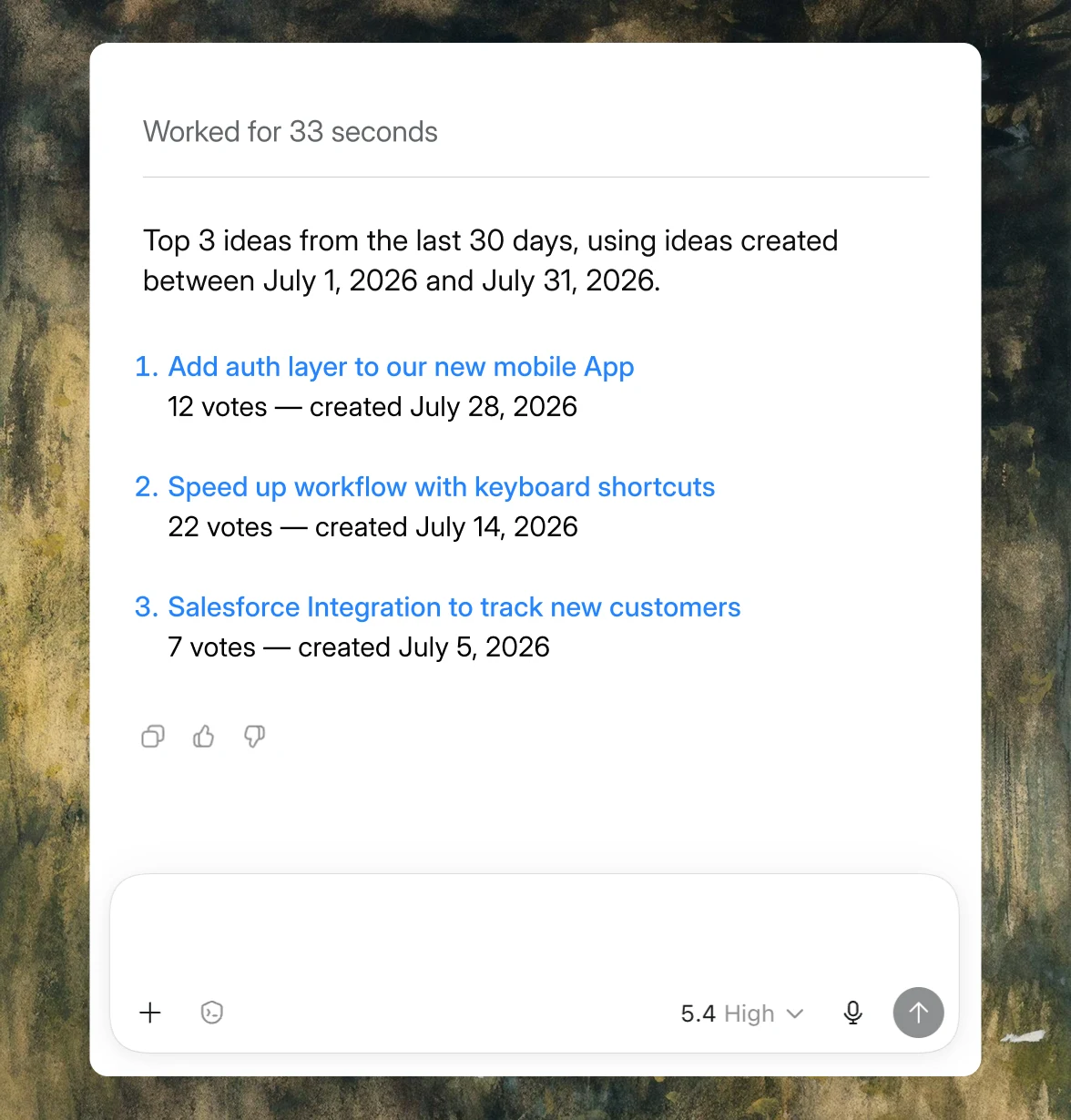
Connect Frill to Claude, ChatGPT, Cursor, or any MCP-compatible client — then ask your AI what your users want in plain English. One API key. Ten tools. Zero setup.

Works with any MCP-compatible client. Confirmed today with:
Claude
ChatGPT
Cursor
Intercom FIN
Anthropic MCP SDK
The USB-C port for AI.
Model Context Protocol is an open standard from Anthropic that lets AI assistants plug into external data — one standard connector, any compatible tool. When we say Frill has an MCP server, we mean any AI client that speaks MCP can read your feedback data the moment you connect it. No custom integration. No plugin marketplace. Just an endpoint and a key.
Endpoint
https://mcp.frill.co/mcp
Auth
Your existing Frill API key
Setup time
Under a minute
Ask, don’t click.
Stop drilling into filters and boards to find the feedback you need. Ask your AI the same question you’d ask a teammate, and get the answer back in seconds — with the raw data behind it.
“List the top 5 voted ideas.”
“Show me every idea tagged ‘billing’ from the last 30 days.”
“Search for ‘dark mode’.”
“Fetch full details for idea abc123.”
ideas_list
Browse and filter ideas by status, topic, or board.
ideas_search
Full-text search across every idea. Catches duplicates before they're logged.
ideas_get
Pull one idea's full detail — description, votes, status, topics, submitter.
comments_list
See every comment on an idea, including internal admin notes.
votes_list
See who voted for what. Filter by idea or by follower.
statuses_list
Fetch your workflow statuses (Open, Planned, Shipped, etc.).
topics_list
List every topic and category.
announcements_list
Browse changelog entries by category and date.
" height="14px" id="jkQCe69Q1" transform="translate(4 5)" width="16px"/></svg>)
announcements_get
Pull the full content of a single announcement.
followers_list
Look up voters and commenters by email.
Each tool returns slim, agent-friendly JSON — optimised for AI consumption, paginated, and multi-tenant by API key.
Connect in one line. Or one config file.
No SDK to install. No OAuth flow. No self-hosting. Grab your Frill API key, paste one command, and you’re live.
Claude
Cursor
Codex
claude mcp add frill --url https://mcp.frill.co/mcp --header "Authorization: Bearer YOUR_API_KEY"
Working on a team? Drop a .mcp.json at your repo root and each dev’s shell handles the key. Full setup docs in the quickstart.
Built for the way you already work.
Different roles, same feedback data. Five ways teams are already using the Frill MCP.
Product managers
“Summarise the top 10 ideas by votes and group them by topic.”
Instant prioritisation snapshot — no dashboard, no exports, no spreadsheet.
Support (Intercom FIN)
“Has anyone requested dark mode?”
Search feedback from inside your support tool before you reply to the ticket.
Engineering leads
“What shipped last quarter?”
Pull your announcements straight into a sprint retro or stakeholder update.
Founders & execs
“What are the open ideas with the most votes?”
Quick pulse-check from Claude Desktop, ChatGPT, or your phone.
Developers (Cursor / Claude Code)
“What feedback exists for the onboarding flow?”
Query user feedback while you’re writing the code that fixes it.
Under the hood.
Production endpoint
https://mcp.frill.co/mcp
Protocol
Model Context Protocol (MCP), HTTP transport
Authentication
Frill API key (Bearer token)
Version
v1
Tool count
10 read-only tools
Hosting
Fully managed by Frill — no self-hosting
State
Stateless per request
Multi-tenant
Yes — scoped by API key
Data format
Slim, agent-friendly JSON
Pagination
Cursor-based, on all list tools
Already using the Frill REST API? You already have your key.
FAQs
What is the Frill MCP Server?
Which AI clients does it work with?
Do I need to install anything?
What can the ten tools actually do?
Can the MCP server write or change data?
Is my data isolated from other Frill customers?
Is this included in my Frill plan?
Where can I find the full setup instructions?
Ask your first question in under a minute.
Grab your Frill API key, paste one command, and start asking your AI what your users want.