How to Launch and Optimize Your In-App NPS Survey [2026 Guide]
Last updated on Mon Dec 15 2025
An in-app NPS survey is one of the simplest, most effective ways to measure customer loyalty. It pops up inside your product and asks the classic question: “How likely are you to recommend this to a friend or colleague?” That’s it. One question—asked at the right moment—can tell you a lot about how your users feel.
Unlike email surveys that land in someone’s inbox hours or days later, in-app surveys capture real-time, in-context feedback. You’re hearing from people while they’re actively using your product, which leads to more responses and better insights. It’s like asking someone what they think of the meal while they’re still eating, not two days later over email.
For product-led businesses, this kind of feedback is gold. It helps you improve user experience, reduce churn, and spot fans you can turn into brand advocates. In-app NPS surveys are lightweight, effective, and a perfect fit for modern growth strategies.
What is Net Promoter Score (NPS) and why does it matter?
Net Promoter Score (NPS) is a simple way to measure how loyal your customers are. You ask one question: “How likely are you to recommend our product to a friend or colleague?” Users respond on a scale from 0 to 10. Based on their answer, they fall into one of three groups.
Promoters (9–10) love your product and are likely to spread the word. Passives (7–8) are satisfied but not enthusiastic. Detractors (0–6) are unhappy and might churn, or worse, discourage others from trying your product. To calculate your NPS, subtract the percentage of Detractors from the percentage of Promoters. That gives you a score between -100 and 100.
NPS is popular for good reason. It’s fast, easy to understand, and gives a clear signal of how your customers feel. That’s why two-thirds of the Fortune 1000 use it—and why it’s trusted across SaaS and digital products.
For product teams, NPS helps you spot issues before they turn into churn. It also highlights happy users you can turn into champions. Whether you’re refining onboarding or testing new features, NPS helps you stay aligned with what your users actually care about.
Why use in-app NPS instead of email or offline methods?
If you’ve ever sent out an email NPS survey and waited… and waited… you already know the problem: timing. By the time the email lands in someone’s inbox, their experience is no longer fresh—and their response rate reflects that. In-app NPS surveys solve this by meeting users where they are: inside your product, while they’re actively using it. That context matters. It leads to more thoughtful responses, better timing, and ultimately, better insights.
Here’s why in-app NPS surveys often outperform other methods:
Higher response rates: users are more likely to respond when it’s quick and timely
Better context: feedback is tied to a specific action or moment, not just a vague memory
Embedded in the user journey: no need to leave the app or click an email
Real-time insights: data comes in immediately, so your team can act fast
Smarter targeting: show surveys only to certain users, after specific actions or milestones
This real-time, in-context feedback loop is a big win for product teams. You’re not just collecting scores—you’re capturing what users are thinking at critical moments in their journey. That means faster course corrections, clearer signals from the right audience, and better decisions overall. In-app NPS surveys give you a direct line to the user experience, while it’s still happening. That’s hard to beat with email.
How to create an in-app NPS survey
Creating an in-app NPS survey is all about timing, relevance, and simplicity.
With the right setup, you can gather honest, actionable feedback without disrupting your user’s experience.
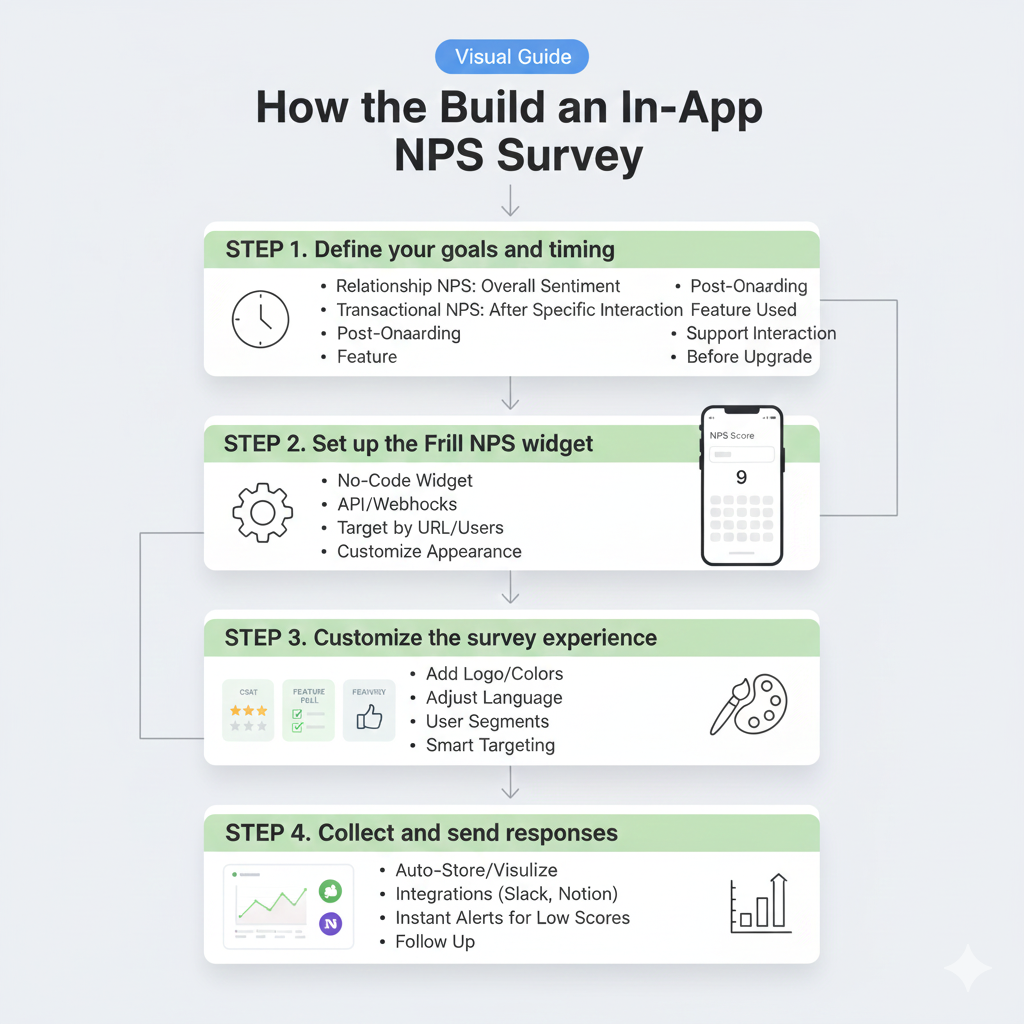
Step 1. Define your goals and timing
Creating an in-app NPS survey isn’t just about asking a question—it’s about asking the right question at the right time. Start by getting clear on what you want to learn.
There are two main types of NPS surveys:
Relationship NPS: measures overall sentiment toward your product or brand
Transactional NPS: captures feedback after a specific interaction or moment
For in-app surveys, transactional NPS is especially powerful. You can trigger surveys after key moments like:
Post-onboarding: get early impressions from new users
After a major feature is used: measure satisfaction with something new
After a support interaction: gather feedback on service quality
Before upgrade prompts: assess loyalty and readiness
Think of it as choosing the right moment in the user journey when emotions and opinions are still fresh. Defining both your goal and timing up front helps ensure the feedback you collect is useful—not just noise.
Step 2. Set up the Frill NPS widget
Setting up the Frill NPS widget is straightforward and flexible. This is perfect for product teams who want feedback without friction. You can install it on your website or app with just a few clicks.
If you’re using Frill already, head to the “Surveys” tab in your dashboard and create a new NPS survey. You’ll choose where and when the survey should appear, whether that’s after a specific feature is used, on a key page, or after onboarding. Frill offers both no-code and developer-friendly options, so whether you prefer a quick embed or want to use the API for advanced triggers, you’re covered.
Here’s how to get started:
Choose a survey placement that aligns with the user journey
Use the no-code widget for easy install on most platforms
Connect via API or webhooks for full control over survey logic
Target by URL, user attributes, or custom events
Customize appearance to match your brand
With the right targeting in place, the Frill NPS widget runs quietly in the background. It gathers high-quality feedback around the clock.
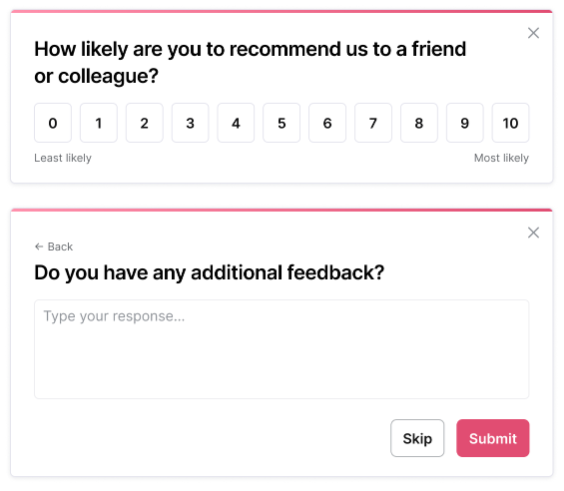
Here's what the NPS widget looks like. Keep in mind you can match the branding to your app.
Step 3. Customize the survey experience
Once your NPS survey is set up, it’s time to make it feel like a natural part of your product. Customizing the survey experience helps build trust and increases completion rates. Frill makes it easy to add your own branding, language, and logic to ensure the survey fits your audience, no matter where they are in the customer journey. Whether you're targeting new users post-onboarding or power users after they engage with a key feature, personalizing the tone and visibility makes a real difference.
Here are a few ways to tailor the experience:
Add your logo, brand colors, and fonts
Adjust tone and language to match your product’s voice
Use different surveys for different user segments
Show or hide surveys based on lifecycle stage or plan tier
Use smart targeting to trigger surveys at the right moment
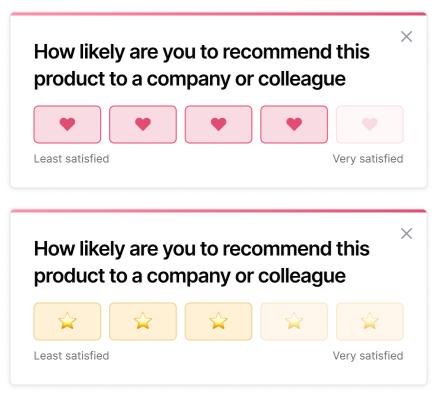
You can also add CSAT surveys to measure satisfaction after specific interactions.
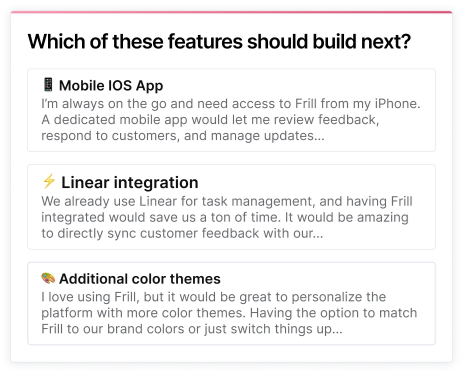
Another customization option is to launch a feature idea poll to prioritize what to build next. Both customization options are available in Frill with just a few clicks.
Step 4. Collect and send responses
Once your in-app NPS survey is live, the next step is collecting responses and making sure they reach the right people at the right time. Frill automatically stores and visualizes all your NPS responses in a clean, easy-to-navigate dashboard. From there, you can see your overall score, dig into qualitative feedback, and track trends over time.
But if you want to take it further, Frill makes it easy to send that data elsewhere. You can use webhooks or the API to push responses into your internal tools, or set up integrations with platforms like Slack, Intercom, and Notion. That way, your product, support, or customer success teams get real-time updates without switching tabs.
You can also enable instant alerts for low scores. If a user gives a 0–6 rating, Frill can automatically notify your team so you can follow up right away. That’s how you turn a potential churn risk into a saved customer and a better product.
Best practices for running effective in-app NPS surveys
To get the most out of your in-app NPS surveys, you need to ask things the right way, at the right time, to the right users.
Ask at the right time (and not too often)
Timing is everything when it comes to in-app NPS surveys. If you ask too early—like before a user has had a chance to explore your product—you’ll get shallow or unhelpful feedback. On the other hand, if you wait too long, they may have forgotten their first impressions. The sweet spot is often after a key interaction, such as completing onboarding or using a core feature. And remember: asking too frequently can lead to survey fatigue. Most teams find a cadence of every 90–120 days works well for ongoing feedback.
Keep the follow-up question simple and actionable
The follow-up question is where you unlock the why behind the score. But if it’s too long or vague, you’ll lose people. Stick to a single, open-ended question that encourages honest, useful responses. Think “What’s the main reason for your score?” or “How can we improve your experience?”
These types of prompts invite direct, thoughtful feedback without overwhelming the user. Avoid asking multiple things at once or using technical language. And don’t forget to tailor your follow-up based on the NPS score—promoters, passives, and detractors often need slightly different framing to get the best responses. Keep it short, clear, and relevant.
Use microcopy to improve engagement
Microcopy might seem like a small detail, but it can make a big difference in how users interact with your in-app NPS survey. A friendly, clear tone builds trust and encourages more people to respond. The goal is to make the experience feel natural and unobtrusive, not like a cold corporate form. This is especially important when you're asking for feedback in the middle of a task or user flow.
Here are some spots where microcopy matters most:
Intro line that sets context for the survey
Button labels that feel personal, not robotic
Follow-up prompts that invite honest answers
Thank-you messages that show appreciation
Tooltips or hints that clarify what’s being asked
These small touches can increase response rates and create a more positive feedback experience overall. Think of microcopy as the human layer of your survey, subtle but powerful when done right.
Segment results by plan, behavior, or lifecycle stage
Not all NPS responses tell the same story. A detractor on your free plan might have very different concerns than a promoter on your enterprise tier. That’s why segmentation is so powerful. It helps you understand who is giving you feedback and why. When you slice your NPS data by customer characteristics, it becomes far more actionable. You can spot trends, prioritize improvements, and tailor your follow-ups based on real user context.
Here are a few smart ways to segment your NPS responses:
Plan type to compare free vs. paid users
Feature usage to identify feedback from power users
Onboarding status to separate new vs. long-time users
Role or team to understand use cases across departments
Company size or industry for B2B insights
Lifecycle stage to track sentiment across the customer journey
This extra layer of context makes your NPS insights richer and far more strategic.
How to interpret your Net Promoter Score
Interpreting your Net Promoter Score (NPS) is just as important as collecting it. A single score can give you a snapshot of customer loyalty, but tracking changes over time is where the real value lies. First, understand the basics—NPS scores range from -100 to +100. Anything above 0 means you have more promoters than detractors, which is a good start. Scores above 50 are considered excellent for most industries.Here’s a quick guide to help you make sense of your number:
0 to 30 is average for many SaaS or tech products
30 to 50 is solid and indicates strong customer sentiment
50+ is excellent—your customers are likely spreading the word
Negative scores mean it’s time to investigate issues fast
Compare your score against competitors or your own historical data
Also, don’t ignore trends. A sudden drop could mean a new bug or pricing change upset users. A big spike? Maybe your latest feature really hit home. Keep watching the curve, not just the number.
What to do with NPS data: closing the feedback loop
Collecting NPS data is only half the job—what you do with it is what actually drives impact. Here’s how to close the loop and turn feedback into action across your team.
For Promoters: Encourage reviews and referrals
Promoters (those who score you a 9 or 10) are your most loyal users, and they’re often eager to spread the word. But to unlock that enthusiasm, you need to make it easy for them. Prompt them at the right time with a friendly follow-up message that invites them to leave a review, share your product with a friend, or join a referral program. You’re not asking for a favor—you’re giving them a chance to be part of your brand’s growth story.
Think about where you send them after they leave a high score. A thank-you message is great, but a small nudge toward advocacy is better. Bonus points if you can personalize the CTA based on their plan, usage, or history.
Here are a few ways to activate your promoters:
Ask for a G2 or Capterra review after a positive response
Offer a simple referral bonus like 1 free month or credit
Invite them to a beta or customer council group
Feature customer quotes in a testimonials section
The easier you make it, the more likely they’ll follow through.
For Passives: Look for patterns and send follow-ups
Passive users (those who score you a 7 or 8) aren’t unhappy, but they’re not excited either. They’re satisfied enough to stick around, but they probably wouldn’t recommend your product just yet. This is your chance to dig deeper. Look for trends in their comments or behaviors: Are they all on a certain plan? Did they churn after a specific action or update? Use that insight to close the gap and turn passive users into promoters.
Even a single thoughtful follow-up message can help re-engage them or spark a conversation that improves their experience.
Here are a few ways to engage passive users:
Send a follow-up email asking what would improve their experience
Invite them to test new features and share early feedback
Offer a personalized tip or resource to boost value
Review session recordings or usage patterns for drop-off clues
With the right nudge, passives can become your next best advocates.
For Detractors: Reach out to resolve pain points
Detractors (those who score you a 6 or below) are the users most at risk of churn. But they’re also giving you a huge opportunity. They took the time to respond, which means they still care enough to give feedback. That’s your opening. Reaching out quickly and personally can go a long way in turning a negative experience into a positive one.
The key is to respond with empathy, not automation. Try to understand what went wrong, then take steps to fix it—or at least show you’re trying.
Here are a few ways to follow up with detractors:
Send a personal message acknowledging their frustration
Ask for a quick call to learn more about their experience
Escalate product bugs or support issues internally
Offer an incentive to give your team another chance
Even if you don’t win every detractor back, you’ll learn something valuable that helps prevent future churn—and that’s just as important.
Build feedback themes with Frill's survey analytics
Once your NPS responses start rolling in, the real magic happens in the patterns behind the numbers. Frill’s built-in survey analytics help you turn open-ended feedback into clear, actionable themes. This gives you more than just a score. It tells you why people feel the way they do. Whether you’re hearing about onboarding confusion, a killer feature, or a support issue, spotting recurring topics is how you move from insight to impact.
Frill’s dashboard makes it easy to:
Tag and group feedback based on topics or themes
Filter responses by score, plan, or lifecycle stage
Sisualize trends over time to see if changes are working
Export or share themes with your product and support teams
Connect feedback themes to roadmap decisions and updates
This kind of thematic analysis helps you prioritize fixes, pitch new ideas with real user quotes, and get buy-in from your team. It’s how you move from guessing to knowing.
Why Frill is the best NPS tool for SaaS teams
Frill is more than just a way to collect Net Promoter Scores—it's a complete customer feedback system, purpose-built for modern SaaS teams.
With Frill, you get a simple yet powerful NPS tool that lives right inside your product. You can trigger targeted NPS surveys, gather CSAT data, and launch quick polls without needing a separate platform or complex setup. It’s designed to capture real-time, in-context insights that actually help you make better product decisions.
What makes Frill stand out?
NPS, CSAT, and Quick Polls all in one place
Feedback, public roadmap, and announcements tightly integrated
Super lightweight widget that won’t slow your app down
Built-in survey analytics to spot trends and themes
Privacy-first with no tracking bloat or user friction
Fast setup with no-code options, API, and webhooks
Loved by product managers, customer success, and support teams
Frill helps your team close the loop, from gathering feedback to sharing what’s shipping. If you want to improve your product with clear, consistent feedback and minimal overhead, this is the tool for you.
In-app NPS survey examples and templates
Not all NPS surveys need to feel the same, and they shouldn't. The timing, tone, and follow-up should all fit the moment and the type of user you’re speaking to. Whether you're checking in after onboarding or catching users at risk of churning, context makes all the difference.
Here are a few in-app NPS survey examples and templates to inspire you:
1. Onboarding NPS survey
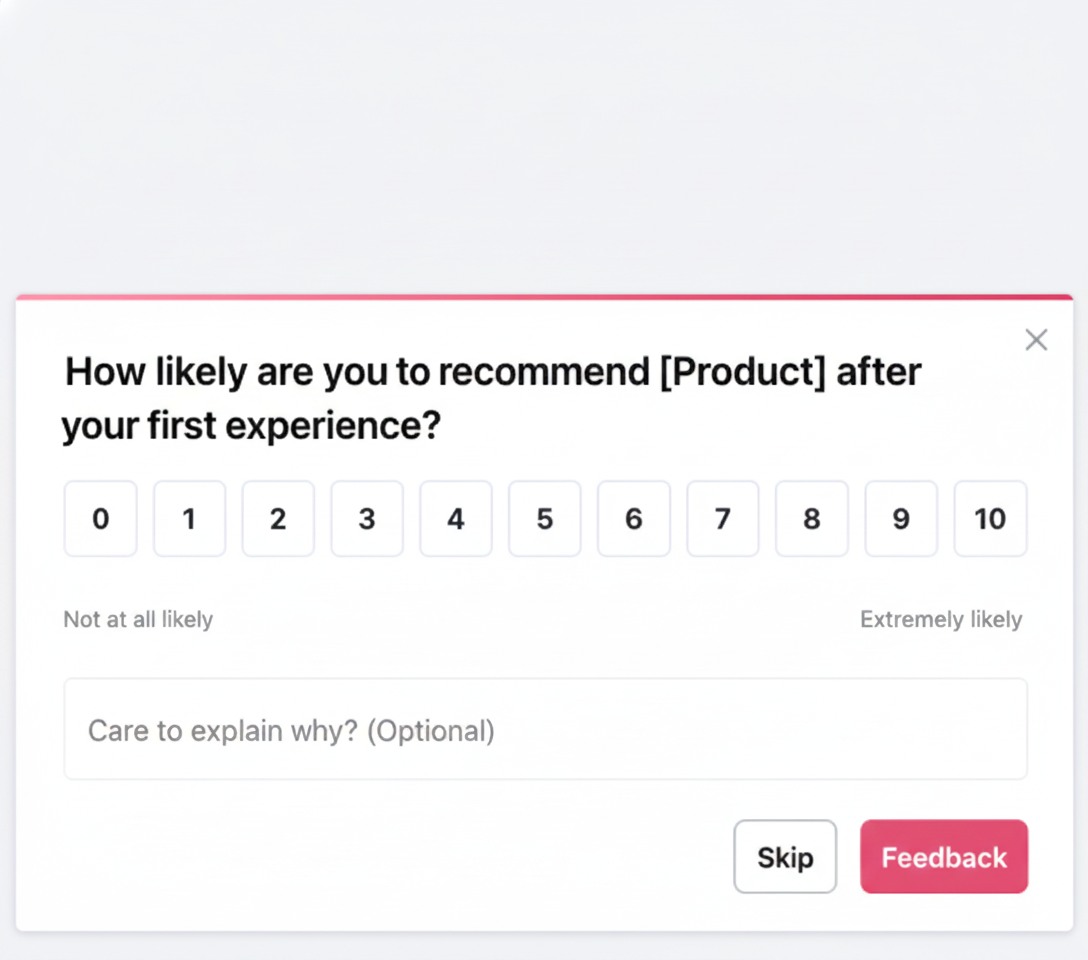
Show this type of NPS survey 7 to 14 days after a new user signs up. Keep the tone friendly and open-ended. New users may still be figuring things out.
Question: “How likely are you to recommend [Product] after your first experience?”
Follow-up: “What could we improve to make your first week better?”2. Post-support NPS survey
2. Post-support NPS survey
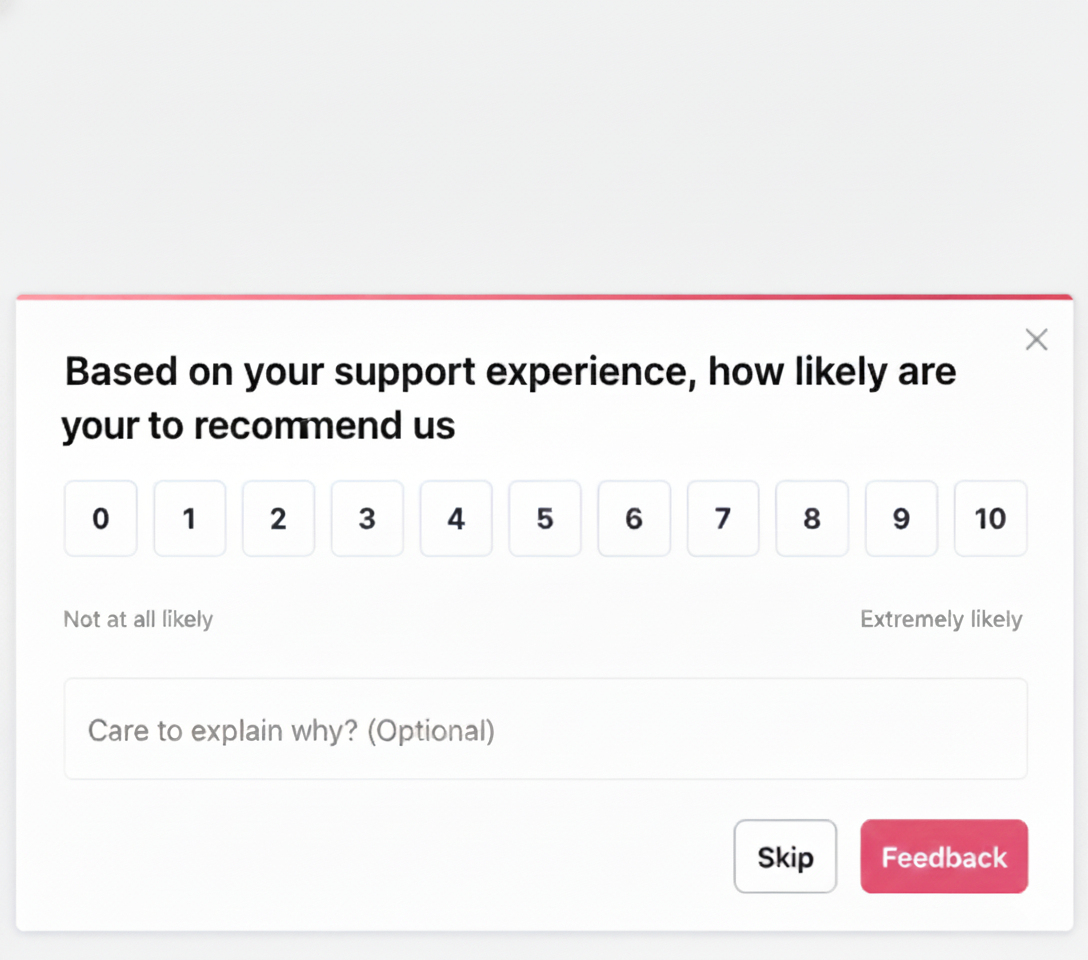
Show this survey right after a user finishes a support chat. Use warm, empathetic copy. Make it feel like part of the support experience—not a form.
Question: “Based on your support experience, how likely are you to recommend us?”
Follow-up: “Did we solve your issue? What could we have done better?”
3. Feature release NPS survey
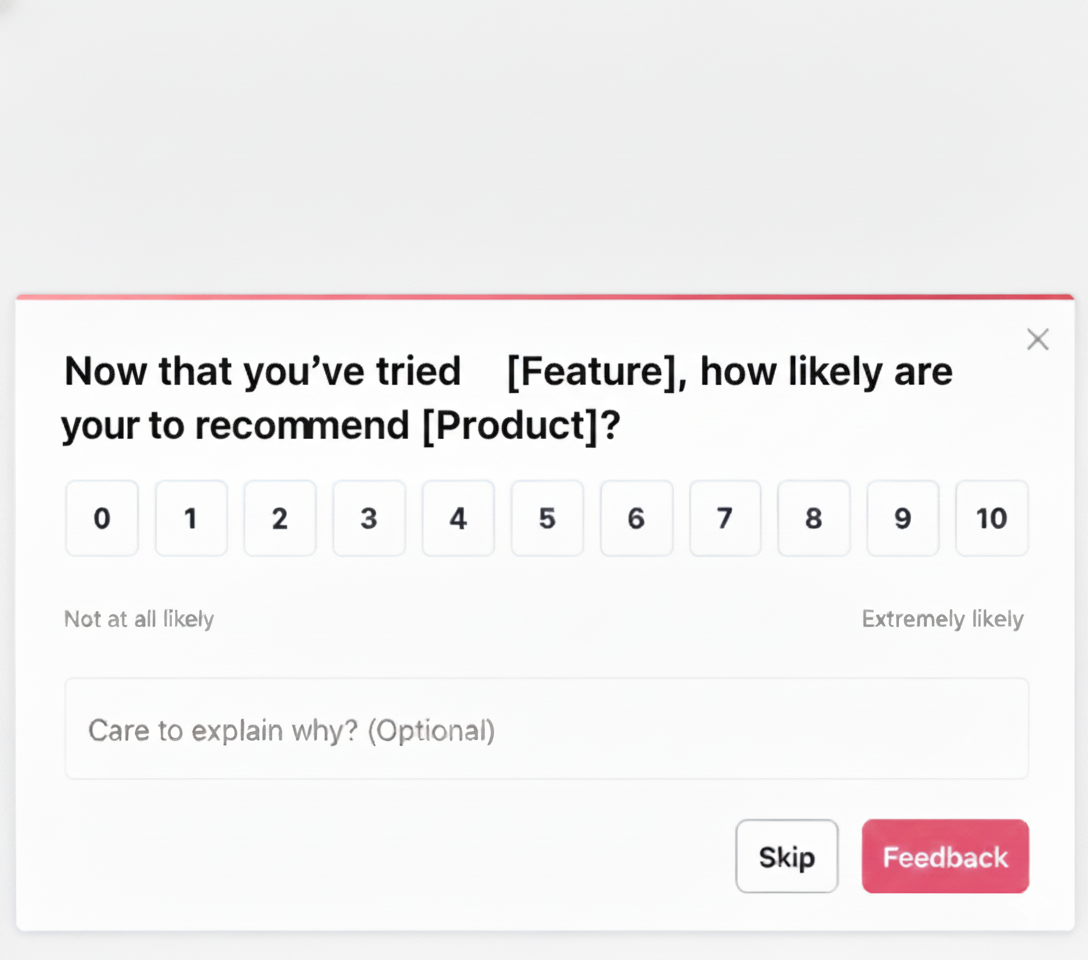
Show this survey after a user interacts with a new feature. This is great for gauging excitement or confusion around new launches.
Question: “Now that you’ve tried [Feature], how likely are you to recommend [Product]?”
Follow-up: “What did you love—or what didn’t work as expected?”
4. Churn risk NPS survey
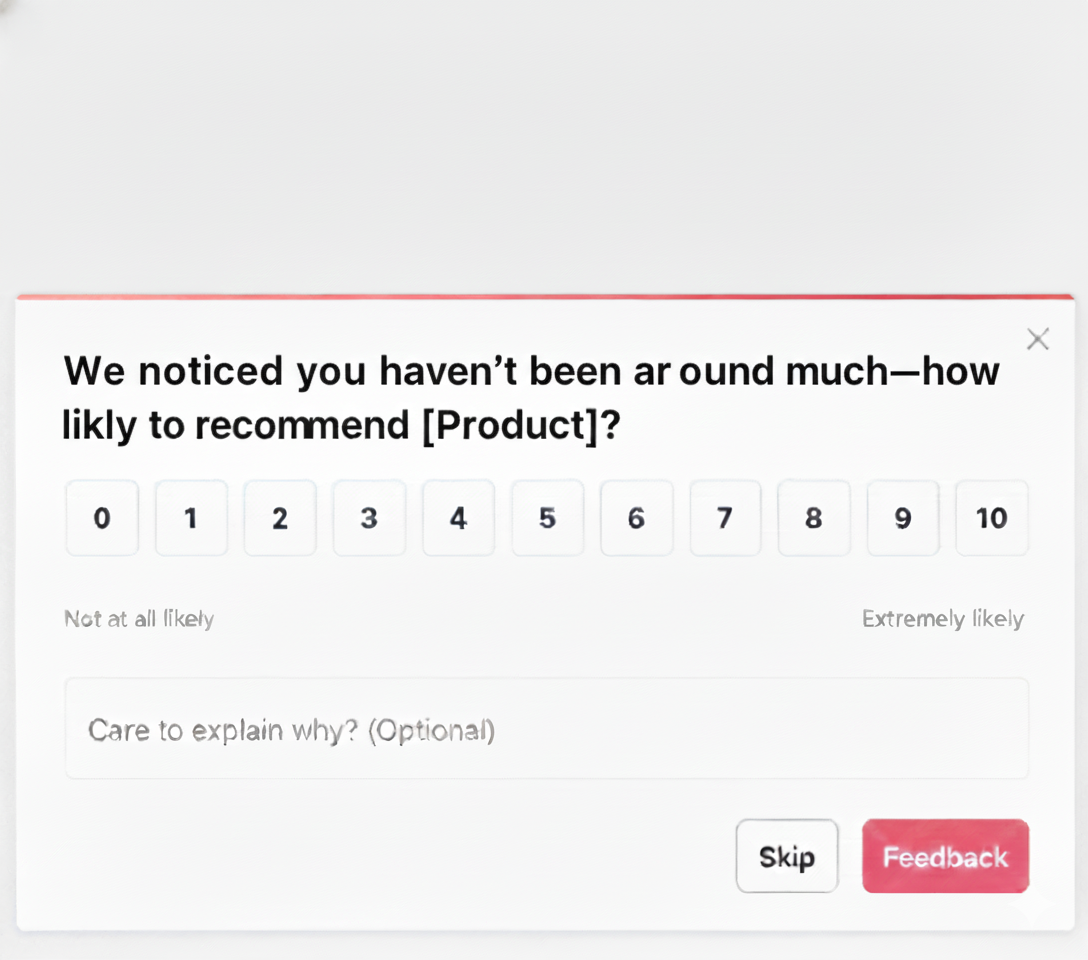
Set up this survey after a drop in usage or signs of disengagement. Be honest, caring, and open to tough feedback. This is your chance to recover the relationship.
Question: “We noticed you haven’t been around much—how likely are you to recommend [Product]?”
Follow-up: “We’d love to hear what’s missing or what’s changed.”
How to adjust the tone for different audiences
Promoters: Keep it confident and appreciative. Reinforce their trust.
Passives: Be curious. Ask how you can improve.
Detractors: Be humble, empathetic, and willing to make things right.
By matching your surveys to the user journey and using thoughtful tone, you’ll get better feedback and stronger relationships.
Frequently asked questions
What is customer feedback software?
Customer feedback software helps you collect, organize, and act on what users think about your product. It makes it easy to gather insights through surveys, polls, or widgets so you can spot issues, prioritize features, and improve user experience without relying on scattered notes or guesswork.
Why is feedback automation important?
Feedback automation ensures you consistently collect insights without adding manual work to your team. It helps you trigger surveys at the right time, route responses to the right tools, and track trends over time. This means fewer missed opportunities, faster product improvements, and a smoother experience for your users.
What types of feedback can these tools collect?
Customer feedback tools can collect a wide range of input, from NPS and CSAT scores to open-ended comments, bug reports, feature requests, and product ratings. You can also use quick polls or idea boards to learn what users want next. Whether it's quantitative or qualitative, these tools help you understand what’s working and where to improve.
Can customer feedback tools integrate with other software?
Yes, most customer feedback tools integrate with your existing stack. You can connect them to Slack, Intercom, Notion, Jira, CRMs, or analytics platforms to route insights where your team already works. This makes it easy to take action on feedback without disrupting your existing workflows.
What’s the difference between qualitative and quantitative feedback?
Quantitative feedback gives you measurable data. Think NPS scores, ratings, or multiple-choice responses. It’s great for spotting trends and tracking performance over time. Qualitative feedback, on the other hand, captures open-ended insights like user comments or suggestions. It helps you understand the “why” behind the numbers and often leads to deeper product and UX improvements.
Do SaaS companies need specialized feedback tools?
Yes. SaaS companies move fast and need scalable, targeted feedback. Specialized tools help you collect insights inside your app, prioritize feature requests, and close the loop with users. They’re designed for continuous improvement, which is key when your product is evolving quickly and customer expectations are high.
Running in-app NPS surveys is one of the simplest, most effective ways to stay in tune with your users and build a product they love.
Ready to put this into action? Try Frill’s lightweight, privacy-friendly NPS widget to launch your first in-app survey in minutes, no dev team required.